Why Internal Links Matter
What Are Internal Links?
Internal links are links that connect one page of a website to another page on the same website. They help users move from one topic to another. For example, if your website has a blog post about healthy food and another. Post about exercise; you can link them together using links.
Why Are Internal Links Important?
Internal links are important for both users and search engines. They help visitors find more useful information. They also help search engines understand your website better. If your website has no links, it can feel like a puzzle with missing pieces.
1. Helps Visitors Stay Longer
When people read your blog and see a helpful link, they might click to read more. This keeps them on your website for a longer time. The longer they stay, the more likely they are to trust your content or buy something from you.
2. Makes Your Website Easy to Use
Good internal links help users move around your website easily. If they want to learn more, they can just click a link instead of searching again. This makes your site easy to explore and user-friendly.
3. Improves SEO Ranking
Search engines use links to discover pages. If you have many links, search engines can find all your pages quickly. This helps your pages show up in search results. Websites with smart internal linking usually rank higher on Google.
4. Shares Page Power
Some pages on your website are stronger than others. These pages can pass their power to weaker pages through links. This helps improve the rank of all pages, not just the popular ones.
5. Organizes Your Website
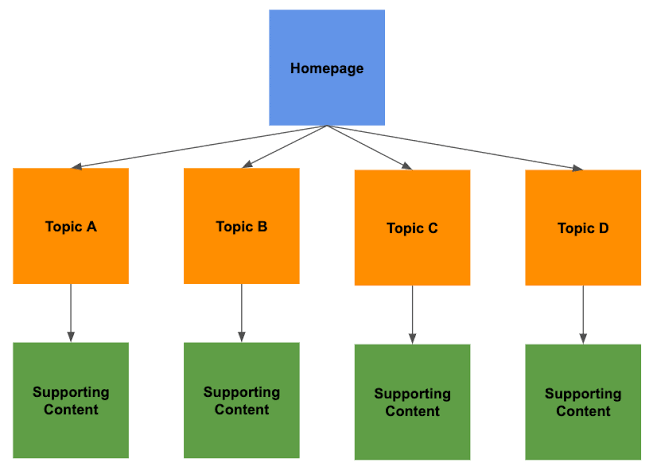
Internal links show the structure of your website. They tell search engines which pages are most important. This helps your site look well-organized and clear. A clean website structure is better for both users and search engines.
How to Use Internal Links
-
Link to related content: When writing a blog post, link to another post on the same topic.
-
Use helpful anchor text: The clickable words in a link should be clear and useful.
-
Don’t overdo it: Too many links can be confusing. Only link when it makes sense.
-
Update old pages: Add new links to older posts to keep them fresh and useful.
Internal Links vs. External Links
links keep users on your site. External links send them to other websites. Both are useful, but links help your site grow stronger and get more traffic.
Conclusion
Internal links are small tools that make a big difference. They help your readers find more information, make your website easier. To use, and help you rank better in search results. By adding helpful links. You can improve your site’s traffic and keep your visitors happy.
Follow us on Instagram and Facebook. For More Products, visit our Website.