Author: admin

  • What are Long-Tail Keywords

    What are Long-Tail Keywords

    What Are Long-Tail Keywords

    What are Long-Tail Keywords

    Understanding Keywords in SEO

    What are Long-Tail Keywords If you want more people to visit your website, you need to use the right words. These words are called keywords. When someone types something into Google, they use keywords to search. If your website has the same words, it can appear in search results.

    However, there are many types of keywords. One type is called long keywords, which can help your site grow faster.

    What Are Long-Tail Keywords?

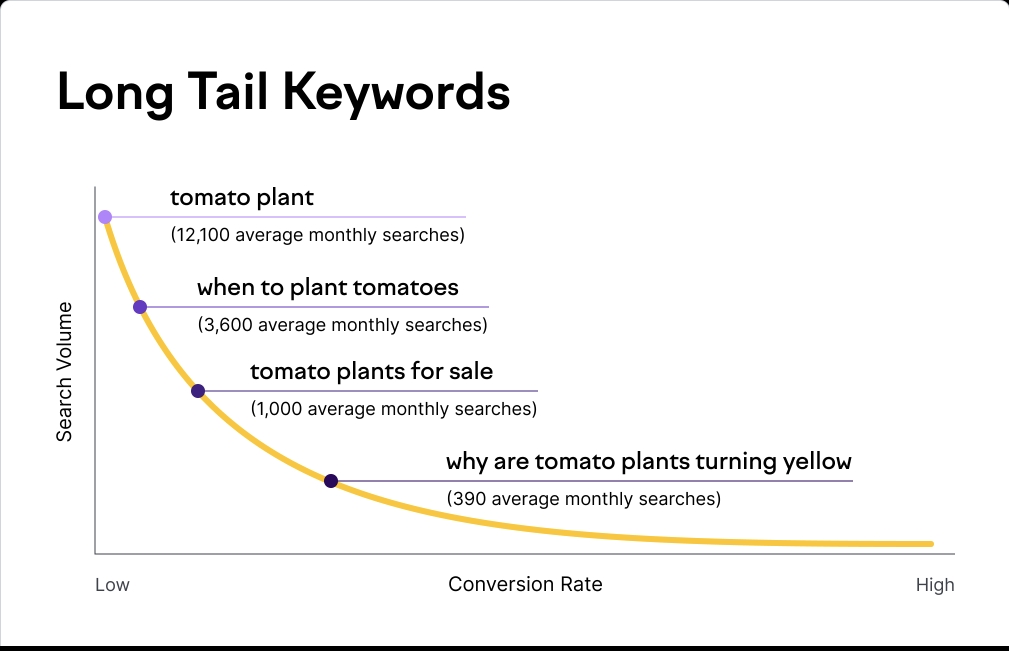
    Long keywords are longer phrases people type when they search online. They are more specific than short keywords.

    For example:

    • Short keyword: shoes

    • Long-tail keyword: best running shoes for flat feet

    Long keywords usually have 3 or more words. They tell more about what the person wants. That’s why they are very helpful in SEO.

    Why Long-Tail Keywords Are Important

    Using long keywords has many benefits:

    1. Easier to Rank

    Short keywords have a lot of competition. Everyone is using them. Long keywords are not used as much, so your website has a better chance to show up on the first page of Google.

    2. More Targeted Visitors

    People who search with long keywords know what they want. If they find your site, they are more likely to buy or take action.

    3. Better for Small Sites

    New or small websites can grow faster with long-tail keywords. You don’t need a big budget or a lot of links to rank for them.

    Examples of Long-Tail Keywords

    Here are some common examples:

    • how to train a puppy at home

    • easy dinner recipes for kids

    • budget travel tips for families

    • best laptops for students under $500

    These are all clear, detailed searches. If your blog or store uses these phrases, it can match what people are looking for.

    How to Find Long-Tail Keywords

    There are easy tools and ways to find long keywords:

    • Google Search Suggestions: Start typing in Google and see what it suggests

    • “People also ask” box: Google shows related questions—these are long-tail keywords

    • SEO Tools: Websites like Ubersuggest, AnswerThePublic, or Google Keyword Planner can help

    • Think Like a User: What would someone type if they were searching for your product or blog?

    Make a list of keywords and use them in your titles, blog posts, and product descriptions.

    How to Use Long-Tail Keywords

    • Put them in your page title

    • Use them in your content naturally

    • Add them to image names and page links (URLs)

    • Don’t stuff them too much—use them where they fit well

    Good SEO is about helping real people, not just search engines.

    Final Words

    Long-tail keywords may be longer, but they are easier and smarter to use. They help your site rank faster, bring in better visitors, and grow your traffic. They are a secret tool that smart website owners use every day.

    Conclusion

    Long-tail keywords are clear, detailed search terms. That can help your website reach the right people. They are easy to rank for and bring better results. If you’re just starting your blog, online store, or business. Start using long keywords today to grow faster and smarter.

    Shop Now

    Follow us on Instagram and Facebook. For More Products, visit our Website.

  • What is keyword Cannibalization

    What is keyword Cannibalization

    What is Keyword Cannibalization

    What is keyword Cannibalization

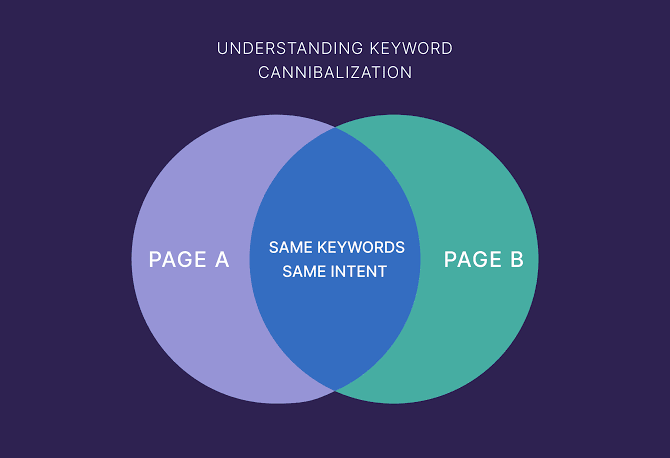
    Keyword cannibalization can hurt your website’s ranking. It happens when two or more pages on your site use the same keyword. Instead of helping your site rank better, it confuses search engines. This makes it hard for your website to perform well. Let’s talk about why this happens and how to fix it.

    What Does Keyword Cannibalization Mean?

    Keyword cannibalization means that many pages on your website. Are competing for the same keyword. For example, if two pages on your site use the keyword. “best laptops for students,” Google doesn’t know which page to rank higher. This can lead to lower rankings or less traffic.

    Why is Keyword Cannibalization Bad?

    Here’s how keyword can affect your website:

    • It Splits Traffic: Instead of one strong page, you have many weaker pages sharing visitors.

    • It Confuses Google: Search engines cannot decide which page to show.

    • It Wastes Time: Creating too many pages for the same keyword doesn’t help your site grow.

    What Causes Keyword Cannibalization?

    Keyword happens because of:

    • Duplicate Content: Similar blogs or pages can overlap on the same keyword.

    • Poor Planning: Without a clear keyword strategy. You might repeat keywords on different pages.

    • Overuse of Keywords: Using the same keyword too many times. Across pages confuses search engines.

    How to Spot Keyword Cannibalization

    You can find keyword by checking:

    • Search Results: If many pages on your site rank for the same keyword. But none are doing well, it might be keyword..

    • Similar Content: Check if your pages have overlapping topics or keywords.

    Use tools like SEMrush or Ahrefs to identify keyword problems easily.

    How to Fix Keyword Cannibalization

    Follow these steps to fix keyword :

    1. Merge Pages: Combine similar pages into one strong page. This improves content quality and rankings.

    2. Use Different Keywords: Update each page with unique keywords to avoid competition.

    3. Redirect Links: If you remove duplicate pages, redirect them to your main page so you don’t lose visitors.

    How to Avoid Keyword 

    To prevent keyword , follow these tips:

    • Plan Keywords: Assign different keywords to every page on your website.

    • Track Content: Check your site’s rankings and keyword performance using SEO tools.

    • Focus on Quality: Create one detailed page for each topic. Instead of several similar pages.

    Conclusion

    Keyword cannibalization can make it harder for your site to rank well. By merging pages, using unique keywords, and creating quality content. You can fix the issue and improve your rankings. Planning will help you avoid this problem and keep your site successful.

    Shop Now

    Follow us on Instagram and Facebook. For More Products, visit our Website.

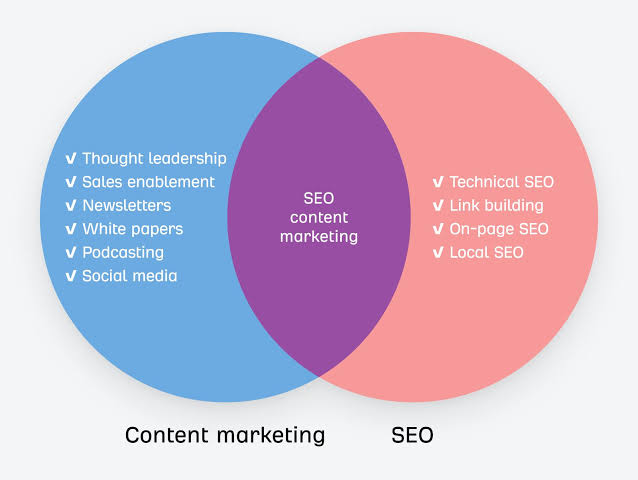
  • How Content Marketing Helps SEO

    How Content Marketing Helps SEO

    How Content Marketing Helps SEO

    How Content Marketing Helps SEO

    Content marketing is a smart way to improve your website’s ranking. It helps you get more visitors by sharing useful and interesting content. Let’s see how Content Marketing Helps SEO works and why it’s so important for SEO.

    What is Content Marketing Helps SEO?

    Content marketing means creating blogs, videos, or guides to give helpful information. The goal is to help your audience while promoting your brand at the same time. For example, a recipe website sharing cooking tips is using content marketing.

    How Content Marketing Helps SEO Boosts 

    Here are some ways content marketing helps your website. Rank higher on search engines:

    • Uses Important Keywords You can add keywords people search for in your blogs or articles. For example, writing about “best skincare products. for dry skin” can help people find your website.

    • Keeps Content Fresh Adding new content shows. Search engines like Google that your site is active. This helps improve your ranking.

    • Gets Backlinks When your content is great, other websites might link to it. These backlinks show search engines that your site is trustworthy.

    Why Quality Content Matters

    Good content keeps visitors on your site longer. It should be:

    • Easy to Read: Make your sentences short and simple. So everyone can understand (Grade 5 readability).

    • Helpful: Answer common questions and solve problems for your audience.

    If readers like your content, they might share it, which brings even more visitors.

    Steps to Create SEO-Friendly Content Marketing Helps SEO

    Here’s how to create content that helps SEO:

    1. Choose the Right Keywords Use tools like Google Keyword Planner. to find popular search terms. Add these words naturally in your titles and content.

    2. Add Headings and Subheadings Headings make your article easy to read. Search engines also use them to understand your content better.

    3. Link Internally Connect your blogs to other parts of your website. This helps visitors explore your site and boosts your SEO.

    4. Write Unique Content Avoid copying content from other sites. Search engines prefer original work.

    Benefits for Your Website

    Here’s why content marketing is great for websites:

    • More Visitors: Useful content brings more people to your site.

    • Higher Rankings: SEO-friendly blogs help you move up in search results.

    • Builds Trust: Informative content makes your audience see you as an expert.

    For example, a fitness blog sharing tips on workouts. Can attract readers and make them trust the brand.

    Common Mistakes to Avoid

    To get better results, avoid these mistakes:

    • Using Too Many Keywords: It makes your content look forced and can hurt your ranking.

    • Not Posting Often: Update your content regularly to keep visitors coming back.

    • Ignoring Proofreading: Fix grammar mistakes to keep your work professional.

    Conclusion

    Content marketing helps SEO by using keywords, keeping content fresh, and gaining backlinks. Writing easy-to-read, helpful content keeps visitors happy and improves your rankings. By focusing on quality and consistency,. Content marketing can make your website a success.

    Shop Now

    Follow us on Instagram and Facebook. For More Products, visit our Website.

  • How To Rank Higher On Google

    How To Rank Higher On Google

    How To Rank Higher On Google

    Getting your website to rank higher on Google is essential for increasing traffic. and building your online presence. Google’s algorithm looks at many factors when deciding. where websites appear in search results. With the right strategies, you can improve your rankings. And stay ahead of the competition.

    What is Google Rank Higher On Google?

    Google ranking shows how high your website appears in search results. Websites at the top get more clicks and visitors. To rank higher, your site needs to meet Google’s rules and offer value to users.

    Use Keywords Wisely Rank Higher On Google

    Keywords help Google understand your content. To use them effectively:

    • Choose long-tail keywords like “best phones under $500,” which are specific. And less competitive.

    • Place keywords in titles, headings, and content.

    Keywords attract visitors who are searching for topics relevant to your site.

    Create High-Quality Content

    Content is king in SEO. For higher rankings:

    • Write content that is helpful and easy to understand (Grade 5 level readability).

    • Use plagiarism-free writing tools to ensure your work is unique.

    • Update your articles regularly to keep them fresh and relevant.

    Improve On-Page SEO

    On-page SEO helps Google understand your website better. Make sure to:

    • Write clear meta titles and descriptions with keywords.

    • Add alt text to your images for better accessibility.

    • Organize your content with proper headings and subheadings.

    Build Backlinks

    Backlinks are links from other websites to yours. They show Google that your site is trustworthy. To get backlinks:

    • Collaborate with industry blogs or websites to share links.

    • Create content that people want to link to, like detailed guides or tutorials.

    Optimize for Mobile Users

    Most people browse websites on their phones. If your site isn’t mobile-friendly, rankings may drop. Here’s what to do:

    • Use responsive design so your website looks good on all screens.

    • Ensure fast loading times by compressing images and files.

    Improve Website Speed Rank Higher On Google

    Google rewards fast-loading websites. To improve speed:

    • Reduce large image files.

    • Remove unnecessary elements that slow down your site.

    Fast websites provide a better experience for visitors.

    Conclusion

    Ranking higher on Google requires consistent effort and smart strategies. Focus on keywords, quality content, and technical optimizations to improve your site. With the right approach, you can attract more visitors and build a strong online presence.

    Shop Now

    Follow us on Instagram and Facebook. For More Products, visit our Website.

  • How Blogs Help SEO

    How Blogs Help SEO

    How Blogs Help SEO

    How Blogs Help SEO

    Blogs play a major role in improving your website’s visibility. They attract visitors, boost rankings, and build trust with your audience. By creating high-quality blogs, you can improve your Search Engine Optimization. (SEO) and reach more people online. Let’s explore how blogs can help SEO and why they are so important.

    What is Blogs Help SEO and Why Does It Matter?

    SEO, or Search Engine Optimization, is the process of improving. Your website so it appears higher in search engine results. Websites with good SEO attract more visitors because they’re easier to find. Blogs are one of the best tools for boosting SEO because they provide fresh, relevant content.

    How Blogs Help SEO Improve

    Here are the key ways blogs help your website rank better:

    • Use of Keywords Blogs allow you to target specific keywords. That match what people are searching for. For example, if your website sells plants, a blog about “How to Care for Indoor Plants” can bring more visitors.

    • Regular Fresh Content Search engines love websites that update. Posting blogs keeps your site active and shows Google that your site is current.

    • Internal Linking Blogs let you link to other pages on your website. helping visitors and search engines explore your content better.

    How Blogs Attract More Visitors

    Blogs help bring in more traffic by answering common questions. For example:

    • A blog titled “Best Laptops for Students in 2025” can attract students looking for advice.

    • Providing helpful and informative content builds trust and keeps visitors coming back.

    Blogs also give you a chance to rank for more keywords and topics, increasing your visibility.

    Tips for Writing SEO-Optimized Blogs

    Here’s how to make your blogs work for SEO:

    1. Use Relevant Keywords Pick keywords people are searching for. Use them naturally in your title, headings, and content.

    2. Write Easy-to-Read Content Keep sentences simple (Grade 5 readability). Blogs should be easy to understand for all readers.

    3. Add Meta Descriptions A meta description summarizes your blog and includes keywords. This helps search engines and users understand your content.

    4. Include Images and Alt Text Images to make blogs engaging. Use alt text (descriptive captions) with keywords to boost SEO.

    Benefits of Blogging for Businesses

    Here’s why blogging is a smart choice for businesses:

    • Builds Authority: Blogs show your expertise. For instance, a tech business writing blogs about “Latest Gadgets” builds. Trust with its audience.

    • Drives Organic Traffic: Instead of paying for ads, blogs. Bring visitors through search results naturally.

    • Supports Social Media: Blog content can be on social media, bringing in even more traffic.

    Common Blogging Mistakes to Avoid

    To make your blogs effective, avoid these mistakes:

    • Keyword Stuffing: Overusing keywords makes your blog look unnatural and can harm rankings.

    • Irregular Posting: Posting once every few months won’t help. Consistency is key.

    • Skipping Proofreading: Errors in grammar or spelling can make readers lose trust.

    Conclusion

    Blogs are a powerful tool for improving SEO. They help your website rank higher. Attract more visitors, and build trust with your audience. By creating informative and engaging content. You can make your site stand out in search results. Start blogging today and see the difference it makes for your website.

    Shop Now

    Follow us on Instagram and Facebook. For More Products, visit our Website.

  • Why is Mobile Optimization Important

    Why is Mobile Optimization Important

    Why is Mobile Optimization Important

    Why is Mobile Optimization Important

    In today’s digital world, most people use phones to browse websites. This means making your website work well on Mobile Optimization Important devices is very important.

    What is Mobile Optimization?

    Mobile optimization means making your website. look good and work well on mobile phones and tablets. It ensures everything, like text, buttons, and images, fits small screens. This helps users easily browse your website on their phones.

    Why is Mobile Optimization Important?

    Here are the main reasons:

    • More People Use Phones Most internet users browse using phones. If your site is not mobile-friendly, you may lose visitors.

    • Better User Experience Visitors will stay longer if your website is easy to use on phones. This makes them want to return to your site.

    • Higher Google Ranking Google prefers websites that work well on mobile devices. Helps your site rank higher in search results.

    How to Make Your Website Mobile-Friendly

    Follow these steps to improve your mobile optimization:

    1. Use Responsive Design Responsive design adjusts your website to fit all screen sizes. Whether someone is on a phone or a tablet, your site will look great.

    2. Speed Up Your Site A slow website makes people leave. Compress images and remove unnecessary files to load pages quickly.

    3. Easy Navigation Make sure menus, buttons, and links are big enough to click on small screens.

    Benefits of Mobile Optimization

    • Increased Traffic Mobile-friendly sites get more visitors. Because they work well for all users.

    • Better SEO Performance Optimized websites rank higher, leading to more visibility.

    • More Conversions If users can shop, read, or sign up on your website, they’re more likely to complete an action.

    Avoid Common Mistakes

    Here are some things to avoid:

    • Small Text: Text that is too tiny makes it hard to read on mobile devices.

    • Pop-Ups: Pop-ups annoy users and may drive them away.

    • Non-Responsive Pages: Pages that don’t adjust to fit smaller. Screens can frustrate users.

    Conclusion

    Mobile optimization is essential for every website. It makes your site easy to use, keeps visitors happy, and improves your ranking on search engines. By focusing on responsive design, speed, and user-friendly layouts. You can make your website a success.

    Shop Now

    Follow us on Instagram and Facebook. For More Products, visit our Website.

  • Why Ranking Drops Happen

    Why Ranking Drops Happen

    Why Ranking Drops Happen

    Why Ranking Drops Happen

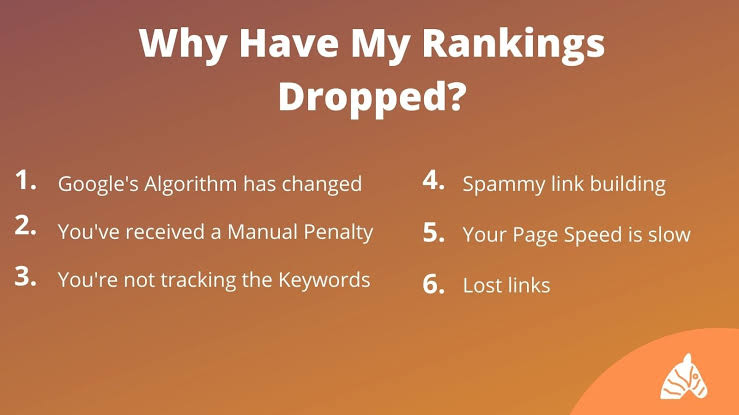
    When a website’s ranking drops, it can be worrying. But fixing the issue starts with understanding why it happens. Ranking Drops Happen change due to many reasons. Like search engine updates, competition, or technical issues. Let’s explore how you can solve this problem and prevent it.

    What Are Ranking Drops Happen?

    A ranking drop means your website moves lower in search results. This can lead to less traffic and fewer visitors. These changes can happen or over time due to various reasons.

    Search Engine Updates Ranking Drops Happen

    Search engines like Google often change their rules, called algorithms. These changes help improve search results but can lower rankings. For sites that don’t follow the latest rules. Reasons for drops include:

    • Using too many keywords (keyword stuffing).

    • Having old or less helpful content.

    • Ignoring things like fast page loading and mobile optimization.

    Stay updated on these changes and adjust your website regularly.

    Technical Problems

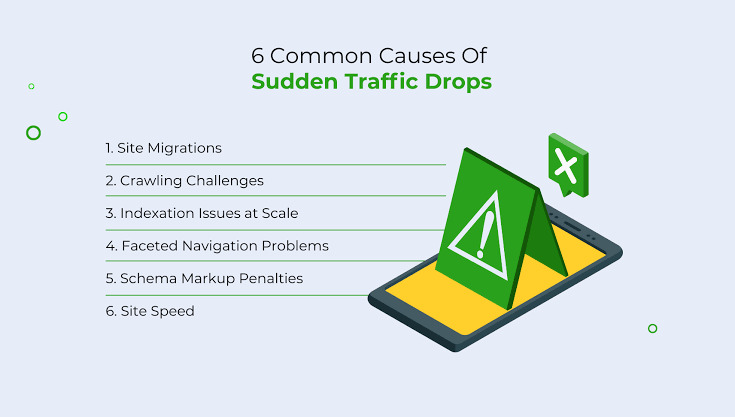
    Technical issues can hurt your rankings too. These include:

    • Broken Links: Links that don’t work can make your website seem unreliable.

    • Slow Website Speed: If your site takes too long to load. Visitors might leave, and search engines will notice.

    • Website Downtime: If your site crashes often, rankings can drop.

    Check your website often for these problems.

    Content Issues Ranking Drops Happen

    Content quality is very important for rankings. Drops can happen when:

    • Your site has copied or repeated content.

    • The information is old and not useful anymore.

    • Your content doesn’t match what people are searching for.

    Focus on creating clear, new, and helpful content that your audience needs.

    Lost Backlinks 

    Backlinks are links from other websites to yours, and they show trustworthiness. Drops happen if:

    • Trusted websites remove their links to your site.

    • Your backlinks come from spammy or low-quality sites.

    Use tools to keep track of your backlinks and maintain high-quality ones.

    Competition

    Sometimes, ranking drops happen because competitors improve their SEO. This includes:

    • Publishing better and updated content.

    • Optimizing their sites for faster speed and mobile users.

    Always work on improving your website to stay ahead.

    Mobile Optimization Issues

    Many people use phones to browse, and websites that don’t work well on mobile can lose rankings. Common issues include:

    • Hard-to-read text or small buttons.

    • Pages that don’t adjust to different screen sizes.

    Make sure your website looks good and works well on all devices.

    Conclusion

    Ranking drops can be fixed by understanding the cause and solving it. From search engine updates to content and technical problems. There are many reasons for changes. Focus on creating quality content, improving your website. And staying updated with SEO trends. These steps will help you recover and keep your rankings steady.

    Shop Now

    Follow us on Instagram and Facebook. For More Products, visit our Website.

  • Why Keywords are Crucial

    Why Keywords are Crucial

    Why Keywords are Crucial

    Why Keywords are Crucial

    Keywords are the heart of SEO. They help search engines connect users with the content they need. If you don’t use the right Keywords are Crucial, your website might not reach the audience you’re aiming for.

    What are Keywords are Crucial?

    Keywords are words or phrases people use when searching for something online. For example, someone might search “easy recipes for dinner” to find cooking ideas.

    Why Do Keywords are Crucial Matter in SEO?

    Keywords are important because they:

    • Help Search Engines Understand Your Content They tell search engines like Google. What your page is about making it easier for them to rank you.

    • Attract the Right Audience Using the right keywords brings. People who are in your topic or product.

    For example, a website selling sports shoes might use keywords. like “best running shoes for beginners.” These keywords bring in visitors who are in buying shoes.

    How to Choose Keywords

    Choosing good keywords is key to success. Follow these tips:

    1. Use Long-Tail Keywords These are longer phrases like “affordable workout gear for women.” They’re more specific and easier to rank for.

    2. Focus on User Intent Think about what your audience needs. Are they looking for products, guides, or reviews?

    Using tools like Google Keyword Planner can help you find. The right keywords for your website.

    Where to Use Keywords

    Placing your keywords correctly makes a big difference. Here’s where they work best:

    • Titles and Headings: They show what your page is about and grab attention.

    • Meta Descriptions: These summaries include keywords and improve click-through rates.

    • Content: Use keywords naturally, so your writing stays clear and easy to read.

    Common Mistakes to Avoid

    Using keywords the wrong way can hurt your rankings. Don’t:

    • Stuff Keywords: Overloading your page with keywords makes it look unnatural.

    • Ignore Alternatives: Use related words or phrases to keep your content engaging.

    Conclusion

    Keywords are essential for helping people find your website. Choose them wisely, use them naturally, and keep your content helpful. By focusing on keywords, you can boost your SEO and reach the audience you’re aiming for.

    Shop Now

    Follow us on Instagram and Facebook. For More Products, visit our Website.

  • What Causes SEO Drops

    What Causes SEO Drops

    What Causes SEO Drops

    What Causes SEO Drops

    SEO (Search Engine Optimization) helps websites rank higher in search engine results. But sometimes, rankings can drop, affecting traffic and business. Understanding the reasons behind Causes SEO Drops is key to fixing them and effectively.

    Why Do Causes SEO Drops?

    An SEO drop means your website has fallen in search engine rankings. This can happen or over time. There are many reasons for this, such as technical issues. Poor content, or changes in competition. Let’s break down these causes to help you avoid them.

    Algorithm Updates Causes SEO Drops

    Google regularly updates its algorithm to improve search results. If your site doesn’t follow the new rules, your ranking might drop. Here’s why:

    • Using too many keywords (keyword stuffing).

    • Not updating your content to match user needs.

    • Ignoring site speed or mobile optimization.

    To stay ahead, always update your strategies with Google’s latest guidelines.

    Technical Issues

    Problems with your website can lead to lower rankings. Common issues include:

    • Broken Links: Links that lead to errors make your site seem unreliable.

    • Slow Website Speed: Slow pages drive users away, and Google notices.

    • Site Downtime: If your website crashes often, it can lose ranking.

    Check your website regularly to fix these technical problems.

    Content Problems

    Your website needs high-quality, unique content to rank well. Drops can happen due to:

    • Copied or Duplicate Content: Google may penalize your site for this.

    • Outdated Information: Content that no longer helps your audience hurts rankings.

    • Low Relevance: If your content doesn’t match what users search for, it won’t perform well.

    Create fresh, useful content that engages and informs your audience.

    Loss of Backlinks

    Backlinks show Google that your website is trustworthy. Losing backlinks can harm your rankings. Here’s how this can happen:

    • Other websites remove their links to your site.

    • Your backlinks come from low-quality or spammy sites.

    Use tools like Ahrefs to track and maintain high-quality backlinks.

    Increased Competition Causes SEO Drops

    SEO is a competitive space. A ranking drop might happen if:

    • Competitors create better, updated content.

    • They optimize their websites faster and for mobile users.

    Keep improving your website to stay ahead of competitors.

    Poor Mobile Optimization

    With more people using phones to browse the web, mobile optimization is essential. Ranking drops can happen if:

    • Your site doesn’t adjust to different screen sizes.

    • Buttons or text are too hard to use on mobile.

    Make sure your website works smoothly on all devices.

    Conclusion

    SEO drops are frustrating but can be fixed. Whether caused by algorithm updates. Technical issues, poor content, or competition, there are ways to recover and improve. Focus on creating valuable content, optimizing your site. And staying updated with SEO trends. Consistency and effort will help you regain your rankings.

    Shop Now

    Follow us on Instagram and Facebook. For More Products, visit our Website.

  • What Increases Google Ranking

    What Increases Google Ranking

    What Increases Google Ranking

    What Increases Google Ranking

    Getting your website to rank higher on Google is a goal that requires focus and effort. While it may seem complicated, there are simple ways. To improve your Increases Google Ranking by following smart strategies. Let’s explore what can boost your position on search results!

    What is Increases Google Ranking?

    Google ranking shows where your website appears in search results. Websites that rank higher get more clicks and visitors. To improve your ranking, you need to enhance your site’s content, keywords, and structure.

    Write Quality Content & Increases Google Ranking

    Content is a big part of improving Google ranking. Make sure your writing is:

    • Easy to read for your audience (Grade 5 level).

    • Original and plagiarism-free, using tools like Grammarly to ensure quality.

    • Helpful and valuable, answering common questions your readers might have.

    Google prefers articles that provide value to the readers.

    Use Proper Keywords

    Keywords help Google understand what your content is about. To use them well:

    • Add specific keywords your audience searches for.

    • Place keywords naturally in titles, headings, and paragraphs.

    • Avoid repeating keywords too much—it can lower your ranking.

    For example, instead of using “smartphones,” try “best budget smartphones in 2025.”

    Optimize Your Website

    A well-organized website makes it easier for Google to rank you. Ensure that:

    • Your pages load fast by reducing image sizes and compressing files.

    • Your site works on phones and tablets—mobile-friendly websites rank higher.

    • You use clear and descriptive titles and URLs.

    When your site is easy to navigate, Google rewards it with better rankings.

    Build Trust with Backlinks

    Backlinks are links from other websites to yours. They show Google that your site is reliable. To get more backlinks:

    • Collaborate with websites in your field for link exchanges.

    • Publish content that people want to share, like guides or tutorials.

    The more trustworthy your backlinks, the higher your ranking will be.

    Increases Google Ranking Focus on Local SEO

    If you’re targeting a specific area, local SEO is important. Here’s how you can use it:

    • Include location-based keywords, like “best salons in Karachi.”

    • Keep your Google My Business profile updated with correct details.

    Local SEO helps your site stand out in searches made by nearby users.

    Conclusion

    Improving your Google ranking takes time. But by focusing on quality content, proper keywords, and website optimization. And backlinks, you can achieve better results. Following these steps will not only help your site rank higher. But also make it valuable for your audience.

    Shop Now

    Follow us on Instagram and Facebook. For More Products, visit our Website.

  • SEO Instant Ranking Results

    SEO Instant Ranking Results

    SEO Instant Ranking Results

    SEO Instant Ranking Results

    Getting your website ranked at the top of search engine results. May seem tricky, but with the right strategies, you can speed up the process. This guide will show simple steps to achieve. Better SEO Instant Ranking Results without waiting too long.

    What is SEO Instant Ranking Results?

    Instant ranking means making your content appear at the top of search results. After publishing. While SEO usually takes time, smart approaches can deliver faster results.

    Use the Right Keywords

    Keywords play a major role in SEO success. Here’s how to choose them:

    • Pick specific keywords that have less competition, like “best tech gadgets 2025.”

    • Focus on words people search for when they’re ready to take action, such as “buy now” or “top reviews.”

    These types of keywords are easier to rank for and attract targeted visitors.

    Write Simple, Valuable Content

    Good content is key to fast rankings. Follow these tips:

    • Make your writing easy to read (Grade 5 level).

    • Answer questions people often ask about your topic.

    • Ensure your content is unique and free of plagiarism.

    Search engines love content that helps readers and keeps them engaged.

    SEO Instant Ranking Results Improve Your Page Setup

    Fixing your web pages can make a big difference. To do this:

    • Add clear meta tags and descriptions using keywords.

    • Use clean URL addresses that match your content.

    • Tag images with keywords using alt text.

    Organized pages are easier for search engines to understand.

    Get Links from Trusted Sites

    Links from other websites make search engines trust your site more. Try this:

    • Ask well-known websites in your field to link back to your content.

    • Create useful posts, guides, or infographics that people want to share.

    The more links you get from reliable sources, the higher your content will rank.

    Make Your Site Mobile-Friendly

    Most searches now happen on phones. To improve rankings:

    • Make sure your site works on all devices.

    • Speed up your site’s loading time.

    Search engines prefer websites that run on mobile phones.

    Boost Local SEO Instant Ranking Results

    If you run a business that serves a specific area, local SEO is essential. Do this:

    • Add your location to keywords, like “best restaurants in Karachi.”

    • Update your profile on Google My Business with complete information.

    This helps people in your area find you faster.

    Conclusion

    Fast SEO results must smart choices. Use specific keywords, write helpful content. Improve your website, and focus on local SEO. Stay consistent and watch your rankings grow.

    Shop Now

    Follow us on Instagram and Facebook. For More Products, visit our Website.

  • Best SEO Practices To Follow 2025

    Best SEO Practices To Follow 2025

    Best SEO Practices To Follow in 2025

    Best SEO Practices To Follow 2025

    SEO (Search Engine Optimization) evolves every year. As we approach 2025, staying ahead of the curve means understanding. New trends and refining old techniques. The ultimate goal remains: to rank higher On search engines and drive organic traffic. Let’s dive into the best SEO practices to follow in 2025!

    What are the best SEO practices to follow in 2025?

    SEO is a process that helps websites appear higher in search engine results. It’s crucial for driving traffic and increasing online visibility. Keeping up-to-date with SEO trends ensures that your content reaches the right audience.

    Optimize for Voice Search

    With advancements in AI and voice recognition technology, voice search optimization is critical. Here are some tips:

    1. Use conversational keywords.

    2. Focus on long-tail keywords matching how people talk.

    3. Create content that answers specific questions.

    Voice search queries are typically longer and more natural-sounding. Make sure your content is accordingly!

    AI-Powered Tools for Best SEO Practices To Follow 2025

    Leverage AI tools to boost your SEO game. From content analysis to keyword research, AI tools. Can save time and improve accuracy. For example:

    • AI tools like enhance readability and grammar.

    • Plagiarism checkers ensure unique content.

    Invest in AI-driven SEO platforms to stay competitive.

    Content Quality is King

    Google continues to rank valuable, authentic content over keyword stuffing. Focus on the following:

    1. Provide in-depth, helpful information.

    2. Maintain a readability level appropriate for your audience. Like Grade 5 simplicity for wider reach.

    3. Ensure your content is plagiarism-free and grammatically impeccable.

    Rank Mobile Optimization

    Did you know that over 50% of web traffic comes from mobile devices? In 2025, mobile optimization isn’t optional—it’s essential!

    1. Ensure your website loads quickly.

    2. Use a responsive design that works across devices.

    Embrace Local Best SEO Practices To Follow 2025

    For businesses targeting specific regions. Local SEO will be even more critical in 2025. Optimize for “near me” searches by:

    • Updating Google My Business profiles.

    • Using location-specific keywords.

    Conclusion

    SEO in 2025 is about adaptability and user-centric approaches. Focusing on voice search, content quality, AI tools, and mobile optimization. You’ll be to conquer search engine rankings in the new year. Start implementing these practices today to stay ahead.

    Shop Now

    Follow us on Instagram and Facebook. For More Products, visit our Website.

  • How Do Google Algorithms Work SEO

    How Do Google Algorithms Work SEO

    How Do Google Algorithms Work in SEO

    How Do Google Algorithms Work SEO

    Google algorithms are the backbone of how search engines. determine which websites show up in search results. These algorithms analyze many factors. to decide the ranking of pages, ensuring users. get the most relevant and high-quality information. If you’re wondering how do Google algorithms work in SEO, this blog will break it down in simple terms.

    Let’s explore how these algorithms function and why they are important for SEO.

    What do Google Algorithms Work on SEO

    Google algorithms are complex systems or formulas. That Google uses to organize and rank web pages. They consider various factors like keywords. Content quality, user experience, and backlinks will be determined. Which pages appear at the top of search results?

    These algorithms are to ensure users get accurate and useful results.

    How Google Algorithms Work SEO 

    1. Crawling and Indexing

    Google’s bots, called crawlers or spiders, scan websites. To collect information about their content. This process is known as crawling. Once the data is collected, it’s stored in Google’s database, called the index. Only indexed pages can appear in search results.

    2. Analyzing Relevance

    When you search for something on Google, its algorithms. Analyze the keywords in your query. They compare your search terms with the content. On indexed pages to find the most relevant results. The closer the match, the higher the page will rank.

    3. Evaluating Content Quality

    Google algorithms rank content that is helpful, original, and well-written. Pages with plagiarism, outdated information, or poor readability are ranked lower. High-quality content is one of the most important factors for SEO success.

    4. Considering User Experience

    Websites that are fast, mobile-friendly, and easy to navigate rank higher. Google values user experience because happy users are more likely to engage with a site. Factors like loading speed and design impact your SEO ranking.

    5. Counting Backlinks

    Backlinks are links from other websites to yours. Google sees backlinks as votes of confidence for your content. If trustworthy sites link to your page. It signals that your site is valuable, and this boosts your rankings.

    6. Monitoring Engagement

    Google also looks at how users interact with your website. For example, if users spend a long time on your site or visit many pages. It shows that your content is interesting and useful. This can improve your ranking.

    Important Updates to Know: Google Algorithms Work SEO

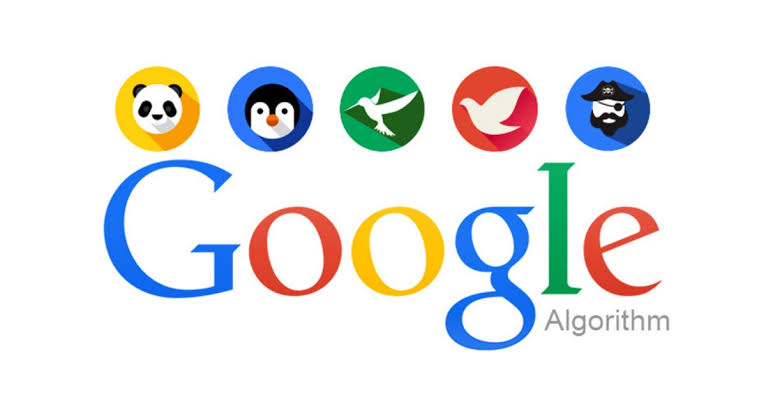
    1. Panda Algorithm: Focuses on content quality and penalizes duplicate or low-quality content.

    2. Penguin Algorithm: Targets sites with unnatural backlinks or spammy practices.

    3. Hummingbird Algorithm: Enhances search accuracy by understanding user intent.

    4. RankBrain: A part of Google’s AI that improves how results match user queries.

    5. Mobile-First Indexing: Gives priority to mobile-friendly websites.

    Conclusion

    Google algorithms work by analyzing factors like keywords. Content quality, backlinks, and user experience to rank websites. They ensure users get relevant and valuable information quickly. Understanding how Google algorithms work helps. You create better SEO strategies and improve your website. And rank higher in search results. Focus on creating high-quality content and providing. A great user experience to stay ahead in the SEO game.

    Shop Now

    Follow us on Instagram and Facebook. For More Products, visit our Website.

  • How Does Website Speed Affect SEO

    How Does Website Speed Affect SEO

    How Does Website Speed Affect SEO

    Website Speed Affect SEO plays a crucial role in SEO (Search Engine Optimization). A fast-loading website improves user experience and helps. Your site ranks higher on search engines like Google. If you’re wondering how website speed affects SEO, this blog will explain it in simple and easy words.

    Let’s dive into why website speed matters and how it can impact your SEO efforts.

    Why Website Speed Affect SEO is Important

    Website speed refers to how quickly your site loads when someone visits it. Search engines rank fast websites because they provide a better experience for users. If your website is slow, visitors might leave before it even loads. Which affects your SEO.

    How Website Speed Affect SEO

    1. Improves User Experience

    Fast websites keep users happy. When pages load quickly, visitors are more likely to stay, explore, and engage with your site. Search engines notice this positive interaction and reward you with higher rankings.

    2. Reduces Bounce Rate

    A slow website leads to a higher bounce rate, which means. People leave your site without exploring it further. A high bounce rate signals to search engines. Your site isn’t meeting user expectations, which can hurt your rankings.

    3. Helps Mobile SEO

    Most people use their phones to browse the internet. If your site loads on mobile devices, it impacts your mobile SEO ranking. Google’s mobile-first indexing means it ranks websites based on their mobile version. Making speed even more important.

    4. Influences Core Web Vitals

    Google uses Core Web Vitals to measure website performance. These metrics include loading speed, interactivity, and visual stability. Websites that perform well in Core Web Vitals are more likely to rank higher in search results.

    5. Boosts Conversion Rates

    Fast websites encourage users to take action, such as making a buy or signing up for a newsletter. Higher conversion rates improve your SEO by increasing user engagement.

    Tips to Improve Website Speed Affect SEO

    • Optimize Images: Compress images to reduce their file size without losing quality.

    • Use a Content Delivery Network (CDN): CDNs deliver content. Faster by using servers close to the user’s location.

    • Enable Browser Caching: This stores static files, so users don’t have to reload. Them every time they visit your site.

    • Cut Plugins: Too many plugins can slow down your site. Remove unnecessary ones.

    • Choose Fast Hosting: A reliable hosting provider ensures your website loads quickly.

    Conclusion

    Website speed affects your SEO by improving user experience. Reducing bounce rate and aligning with Google’s ranking factors. A fast-loading site not only ranks higher but also keeps visitors happy and engaged. Focus on optimizing your website speed to enhance. Your SEO strategy and grow your online presence.

    Shop Now

    Follow us on Instagram and Facebook. For More Products, visit our Website.

  • What is Role of Schema Markup

    What is Role of Schema Markup

    What is the Role of Schema Markup

    What is Role of Schema Markup

    Schema markup is a type of code that helps search engines. Better understand your website’s content. It is also called structured data and is in a specific format. Format to make information easier for search engines like Google to process. If you’re curious about the role of schema markup, this blog will explain its importance in simple words.

    Let’s dive into how schema markup works and why it matters for SEO.

    What is Schema Markup

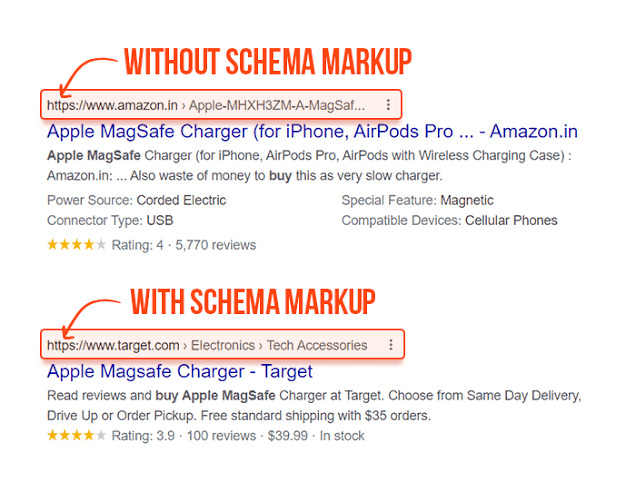
    Schema markup is a tool that adds extra details to your website’s content. Making it clear for search engines. For example, if your website shares. A recipe, schema markup can highlight details like cooking time, ingredients. And user ratings. This extra information appears in search results as rich snippets. Which can attract more users.

    Why is Schema Markup Important

    Improves Search Visibility

    Using schema markup makes your website stand out in search results. Rich snippets, like star ratings or product prices, catch the attention. of users and increase the chances of them clicking on your site.

    Enhances User Experience

    Schema markup gives users quick answers. By displaying important details directly in search results. For example, the event schema shows the date. Time and location, saving users the trouble of opening many links.

    Helps Search Engines Understand Content

    Search engines rely on schema markup to identify what your content is about. This makes it easier for them to rank your site for relevant queries, improving your SEO.

    Boosts Click-Through Rates (CTR)

    With schema markup, your content looks more detailed and professional in search results. This can increase the number of people clicking on your site.

    Provides Rich Results

    Rich results like FAQs, reviews, or videos appear because of schema markup. These results give more information to users and improve engagement.

    Types of Schema Markup

    1. Recipe Schema: Adds details like ingredients, preparation time, and cooking steps.

    2. Product Schema: Highlights product price, availability, and reviews.

    3. FAQ Schema: Displays frequently asked questions and answers directly in search results.

    4. Event Schema: Shows event details like date, time, and location.

    5. Review Schema: Displays star ratings and user reviews.

    Conclusion

    The role of schema markup is to make your website’s content easier. To understand for search engines while improving user experience. It helps you stand out in search results. Boosts click-through rates and provides rich results that attract users. Adding schema markup to your website is a simple yet powerful way to improve. Your SEO strategy and reach more people online.

    Shop Now

    Follow us on Instagram and Facebook. For More Products, visit our Website.

  • What is Technical SEO and Why

    What is Technical SEO and Why

    What is Technical SEO and Why

    What is Technical SEO and Why

    Technical SEO is all about improving the technical aspects. of your website so search engines like Google can crawl, index, and rank it. The technical standards set by search engines. If you’re asking what is technical SEO and why it matters, this blog will explain it in simple terms.

    What is Technical SEO

    Technical SEO focuses on optimizing your website’s backend features. This includes improving site speed, fixing broken links. Making your site mobile-friendly and ensuring your website is secure. It’s called “technical” because it deals with the technical setup of your site.

    Search engines use bots to crawl your website. If your site has technical errors, these bots might not index it =, which affects your rankings.

    Why is Technical SEO Important

    Helps Search Engines Understand Your Website

    Search engines need to understand what your website is about. SEO makes it easier for search engine bots to crawl and index your site. If your website is well-optimized , it has a better chance of ranking higher.

    Improves User Experience

    SEO ensures your website loads. Works well on mobile devices and has no broken links. A website that runs keeps users happy, leading to more traffic and engagement.

    Boosts Rankings

    Search engines rank sound websites. If your site follows the technical rules, it will likely rank higher. Than competitors who ignore these factors.

    Makes Your Website Secure

    One important part of SEO is using HTTPS (a secure version of your website). HTTPS makes your site safe for users and builds trust, which also improves your rankings.

    Key Features of Technical SEO

    1. Site Speed: Your website should load quickly. Slow sites lose visitors.

    2. Mobile-Friendly Design: Most people browse on their phones. Ensure your website works well on all devices.

    3. Structured Data: Use schema markup to help search engines understand your content better.

    4. Crawlability: Make sure search engines can easily navigate your site.

    5. Secure Website: Always use HTTPS for security.

    6. Fix Broken Links: Remove or update links that don’t work.

    Conclusion

    What is technical SEO and why is it important? It’s the foundation of a well-functioning website that search engines can crawl and rank. By focusing on SEO, you improve user experience, boost rankings. And make your website secure. Pay attention to your site’s technical features to ensure. It performs well and attracts more visitors.

    Shop Now

    Follow us on Instagram and Facebook. For More Products, visit our Website

  • How Does Social Media Affect SEO

    How Does Social Media Affect SEO

    How Does Social Media Affect SEO

    Social Media Affect SEO, and SEO (Search Engine Optimization) goes hand in hand. While social media doesn’t affect search engine rankings. If you’re wondering how social media affects SEO, this blog will explain in simple words.

    Let’s see how social media helps improve your SEO strategies.

    Social Media Affect SEO and Increases Website Traffic

    When you share your website content on social media platforms. Like Facebook, Instagram, or Twitter, more people visit your site. These visits tell search engines like Google that your website is valuable and popular. This can help improve your rankings.

    Builds Backlinks

    Backlinks are links from other websites to yours. Social media helps you get more backlinks by sharing your content with a larger audience. If people find your content helpful, they might link to it on their blogs or websites.

    Boosts Content Visibility

    When you post on social media, more people see your content. This increases your chances of getting noticed by influencers or websites. that might share or link to your posts. The more people engage with your content, the better it is for your online presence.

    Helps With Keyword Optimization

    Social media can give you ideas for popular keywords. For example, by checking trending hashtags or topics. You can create content that matches what people are searching for. This makes your website more relevant to your audience.

    Social Media Affects SEO and Increases Brand Awareness

    Being active on social media helps build your brand. When people recognize your brand, they are more likely to search for it online. These branded searches can improve your website’s ranking on search engines.

    Social Media Affect SEO Improves Local SEO

    For businesses targeting local customers, social media is a powerful tool. Platforms like Facebook allow you to connect. With local audiences through posts, events, and ads. This improves your local visibility and strengthens your local SEO.

    Encourages User Engagement

    Social media platforms allow users to comment, share, and like your content. Higher engagement signals that your content is useful and valuable. Although this doesn’t impact SEO, it boosts your online reputation. Which is important for search engines.

    Conclusion

    How does social media affect SEO? It supports your SEO strategy by driving traffic. Building backlinks and increasing content visibility. It also helps with keyword research, boosts brand awareness, and improves user engagement. While social media doesn’t directly affect search engine rankings, it plays a vital role. iInstrengthening your online presence. Use social media, and you’ll see the positive effects on your SEO efforts.

    Shop Now

    Follow us on Instagram and Facebook. For More Products, visit our Website.

  • How Does AI Impact SEO Strategies

    How Does AI Impact SEO Strategies

    How Does AI Impact SEO Strategies

    How Does AI Impact SEO Strategies

    AI Impact SEO Strategies, or Artificial Intelligence, is changing the way businesses operate. Use SEO (Search Engine Optimization). It makes SEO easier, faster, and smarter. If you’re wondering how AI impacts SEO strategies. This blog will explain everything in easy words.

    Let’s learn how AI helps improve SEO step by step.

    AI Impact SEO Strategies Make Keyword Research Simple

    Finding the right keywords is one of the main parts of SEO. AI tools like Google Keyword Planner and SEMrush find popular keywords. These tools show you what people are searching for and suggest the best words for your content. This saves time and helps improve your website’s ranking.

    AI Impact SEO Strategies Help Write Great Content

    AI can help you write better content. Tools like Grammarly fix grammar mistakes, while AI assistants do. Do Like ChatGPT gives you ideas and suggestions. AI makes sure your content is clear, easy to read, and free of plagiarism. Review the content yourself to make it sound natural.

    Improves User Experience

    Websites that give a good user experience rank higher on Google. AI helps by checking your site’s loading speed and layout. It shows if users are having trouble, like leaving your site too quickly. You can use this data to improve your website’s design.

    Optimizes Voice Search

    Many people now use voice assistants like Alexa or Google Assistant to search online. AI helps optimize for voice search by focusing on simple, conversational keywords. For example, instead of typing “best SEO tools,” someone might ask, “Which SEO tools should I use?” AI ensures your content shows up in these searches.

    Fixes Issues Faster

    AI-powered tools like Ahrefs and Moz find problems on your website. They highlight broken links, missing descriptions, or slow pages. Fixing these issues improves your website’s performance and ranking.

    Predicts Trends

    AI studies what people search for and predicts future trends. For example, if more people start searching for “AI in marketing,” AI tools. Will suggest creating content about it. This keeps your website updated and relevant.

    AI Impact SEO Strategies Personalizes Content

    AI can suggest personalized content based on user preferences. For example, an online store can recommend products based on. What people searched for before. This keeps users interested and boosts engagement.

    Conclusion

    AI makes SEO strategies smarter and simpler. It helps with keyword research, improves content, and fixes website problems faster. AI also optimizes for voice search, predicts trends, and creates personalized content. By using AI tools, businesses can save time and attract more visitors to their websites. Start using AI today to improve your SEO strategy.

    Shop Now

    Follow us on Instagram and Facebook. For More Products, visit our Website.

  • Best SEO Tools For Beginners

    Best SEO Tools For Beginners

    Best SEO Tools For Beginners

    Best SEO Tools For Beginners

    If you’re starting with SEO, don’t worry! This blog will explain the best SEO tools for beginners in simple and easy words. SEO (Search Engine Optimization) is essential because it helps your website rank. Higher on Google, so more people can find it. Using the right tools makes SEO easy, even if you’re new to it.

    Let’s see which tools are best for beginners and how they help.

    What Are SEO Tools And Why Are They Useful

    SEO tools are like helpers that make your job easier. They show you which keywords to use, track your site’s performance, and give tips to improve your content. Beginners can use these tools to save time and grow their websites.

    Best SEO Tools For Beginners

    Google Keyword Planner

    This is a free tool by Google. It helps you find the right keywords for your content. You can see how many people search for a specific word and choose the best ones to add to your article.

    Google Analytics

    Google Analytics shows you how your website is doing. It tells you how many people visit, which pages they like, and where they come from. This is great for learning about your audience.

    Yoast SEO

    If your website is on WordPress, Yoast SEO is perfect. It helps you make your content better by adding keywords. Fixing readability and writing good meta descriptions.

    Ubersuggest

    Ubersuggest is another amazing tool for beginners. It helps with keyword research, content ideas, and analyzing competitors. It also gives you tips to improve your SEO step by step.

    Answer The Public

    This tool is great for creating helpful content. It shows you what questions people are asking online. For example, if you search for “shoes,” it will show questions like “Which shoes are best for running?”

    How To Start Using SEO Tools

    1. Choose Free Tools First: Start with free tools like. Google Keyword Planner or Analytics. They are simple and helpful for beginners.

    2. Focus On Keywords: Use the tools to find words that match your website’s topic. Use them naturally in your articles.

    3. Track Your Website: Check your site’s performance regularly to see what works well.

    4. Keep Learning: Explore new tools and tips as you improve your SEO skills.

    Conclusion

    The best SEO tools for beginners are easy to use and make SEO simple. Tools like Google Keyword Planner, Google Analytics. Yoast SEO and Ubersuggest help you rank higher on Google and attract more visitors. Start with these tools and keep working on your website. With time and effort, you’ll see great results.

    Shop Now

    Follow us on Instagram and Facebook. For More Products, visit our Website.

  • What is Local SEO and How

    What is Local SEO and How

    What is Local SEO, and How

    What is Local SEO and How

    Local SEO and how to improve it are essential topics. For businesses looking to attract customers nearby.SEO (Search Engine Optimization) helps your business. Appear in local search results on platforms like Google. If someone searches for “restaurants near me” or “shops in Karachi,” SEO makes. Sure, they find your business.

    Let’s learn about local SEO and how you can make it work for you.

    Local SEO Means Better Visibility

    Local SEO is all about making your business visible to people online. Search engines use your location and information. To show your business to people near you. For example, if you run a bakery in Karachi. People looking for a “bakery in Karachi” should be able to see your shop in the results.

    The better your SEO, the easier it is for customers to find you.

    Simple Tips to Improve Local SEO

    Optimize Your Google My Business

    Google My Business is a free tool that shows your business on Google Maps and search. Update your profile with the correct name, address, and working hours. Add photos of your shop or products, and ask happy customers to leave good reviews.

    Add Local Keywords

    Use keywords related to your area. Instead of saying “best bakery,” say “best bakery in Karachi.” Add these keywords to your website titles, content, and meta descriptions.

    Collect Reviews from Customers

    Good reviews make a big difference. They show search engines that your business is trusted. Ask your customers to leave reviews on Google or other platforms.

    Make Your Website Mobile-Friendly

    Most local searches happen on phones. Your website should look good and work fast on mobile devices. If it’s hard to use on a phone, people might leave.

    Use Local Content Local SEO

    Write blogs or create posts about local events or tips related to your business. For example, a bakery in Karachi could post about “Best Desserts for Karachi’s Weather.”

    Conclusion

    What is local SEO, and how to improve it? It’s simple: focus on making your business easy to find for people nearby. Use Google My Business, and add local keywords. Collect reviews, and keep your website mobile-friendly. These steps will bring more customers and help your business grow.

    Shop Now

    Follow us on Instagram and Facebook. For More Products, visit our Website.

Follow by Email
Facebook
Instagram