Author: admin

  • How SEO Drive Sales

    How SEO Drive Sales

    How SEO Drives Sales

    SEO Drive Sales If you have a business website, you want more people to visit and buy from you. One of the best ways to do this is through SEO. SEO stands for Search Engine Optimization. It helps your website show up in Google and other search engines. More people visiting your site means more chances to make sales.

    What Is SEO Drive Sales?

    SEO is making your website easy for search engines to find. When someone types a word or question into Google, SEO helps your website show up in the appearance.

    For example, if you sell shoes and someone. Types “buy running shoes online,” your site can appear if you have the right SEO in place.

    How SEO Brings More Visitors

    The more people who visit your website, the more chances you have to make a sale. SEO helps in many ways:

    Targeted Traffic

    SEO brings in people who are already looking for what you sell. These visitors are more likely to buy.

    Better Visibility

    Good SEO puts your site higher on search pages. People usually click on the top results, so your site gets more views.

    How SEO Drive Sales Help Convert Visitors into Buyers

    SEO doesn’t just bring people to your site—it helps them stay and take action. Here’s how:

    Fast Website

    A quick-loading site keeps people from leaving. This means more chances they’ll buy something.

    Easy-to-Read Content

    Simple and clear pages help users understand your products. This builds trust and helps them decide to buy.

    Clear Calls to Action

    SEO-friendly pages often include buttons or links like “Buy Now” or “Contact Us.” This makes it easy for users to take the next step.

    SEO Builds Trust

    Search engines like Google want to give users good results. If your site has helpful content. Fast speed, and mobile-friendly design, rank higher. This makes your site look more trustworthy to people, and they feel safer buying from you.

    Local SEO Drives Store Sales

    If you have a shop or business in one place, local SEO helps people nearby find you.

    For example:

    • A person types “pizza near me”

    • Your pizza shop shows up in the results

    • They call or visit your place

    This brings more people through your doors and helps increase sales.

    SEO Drive Sales Works Long-Term

    Unlike ads that stop when you stop paying, SEO keeps working. If your page ranks well, it can bring traffic and sales for months or even years.

    Conclusion

    SEO helps grow your sales by bringing more people to your site. Keeping them there, and turning them into buyers. It builds trust and works long-term. Whether you sell online or in a shop, SEO is one of the smartest ways to grow your business. Start with simple steps today and watch your sales grow over time.

    Shop Now

    Follow us on Instagram and Facebook. For More Products, visit our Website.

  • Why Website Speed Matters

    Why Website Speed Matters

    Why Website Speed Matters

    Why Website Speed Matters

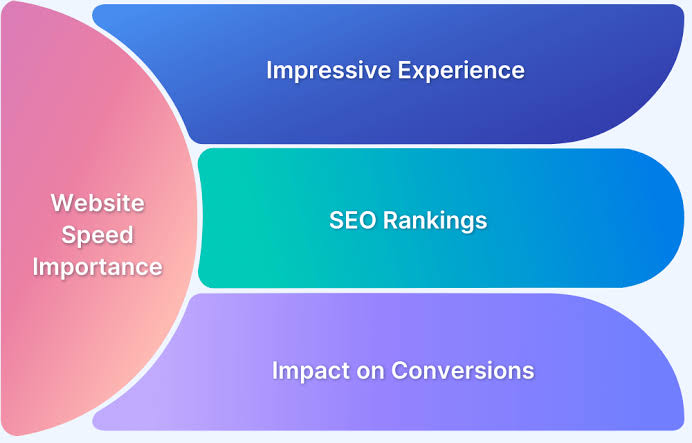
    When Website Speed Matters someone clicks on your website, they want it to load fast. If your site is slow, they might leave. That’s why website speed is important. It helps people stay longer and keeps your website strong on search engines like Google.

    What Is Website Speed Matters?

    Website speed means how quickly your web page opens. A fast website opens in 1 to 3 seconds. If your site takes more than 5 seconds, most people won’t wait. They’ll close the page and look somewhere else.

    How Website Speed Matters Affects SEO

    Search engines care about speed. When your site loads fast, it shows that your website is user-friendly. Google wants to show the best pages first. A slow website can lose its rank on search results.

    Fast websites:

    • Get more visitors

    • Stay higher in Google search

    • Keep people on the page longer

    Why Website Speed Matters & People Leave Slow Sites

    If a page takes too long, visitors may:

    • Click the back button

    • Not buy anything

    • Not come back again

    This can hurt your business or blog. A fast site helps you keep users and make them happy.

    What Slows a Website Down?

    Several things can make your site slow. Here are some common reasons:

    Big Images

    Large pictures take more time to load.

    Cheap Hosting

    Low-cost hosting may not give enough speed or power.

    Too Many Ads

    Ads can slow down your site by loading extra content.

    Extra Plugins

    Using too many add-ons or features can make pages load slower.

    How to Make Your Site Faster

    Here are some easy ways to improve speed:

    Resize Images

    Use small image sizes that still look good.

    Pick Good Hosting

    Use a trusted hosting company that offers speed and support.

    Keep It Simple

    Don’t overload your site with too many designs or tools.

    Remove Unused Plugins

    Delete anything you are not using. It helps your site run faster.

    Tools to Check Website Speed Matters

    You can check your website speed using free tools like:

    • Google PageSpeed Insights

    • GTmetrix

    • Pingdom

    These tools show what’s slowing your site and how to fix it.

    Why Website Speed Matters Helps Businesses

    Fast websites help users finish actions like:

    • Buying a product

    • Signing up for a newsletter

    • Reading a blog

    A faster site means more success for your business or brand.

    Conclusion

    Website speed matters more than you think. A slow website can lose visitors, rank lower, and hurt your growth. But with small steps, like using smaller images and better hosting, you can make your site faster. A quick-loading website is better for users and better for your future online.

    Shop Now

    Follow us on Instagram and Facebook. For More Products, visit our Website.

  • Why Backlinks Boost SEO

    Why Backlinks Boost SEO

    Why Backlinks Boost SEO

    Why Backlinks Boost SEO

    Backlinks Boost SEO If you want your website to show up on Google, you need good SEO. One of the most important parts of SEO is backlinks. But what are backlinks, and why do they help so much?

    Let’s explore how backlinks can boost your SEO and bring more people to your site.

    What Are Backlinks Boost SEO?

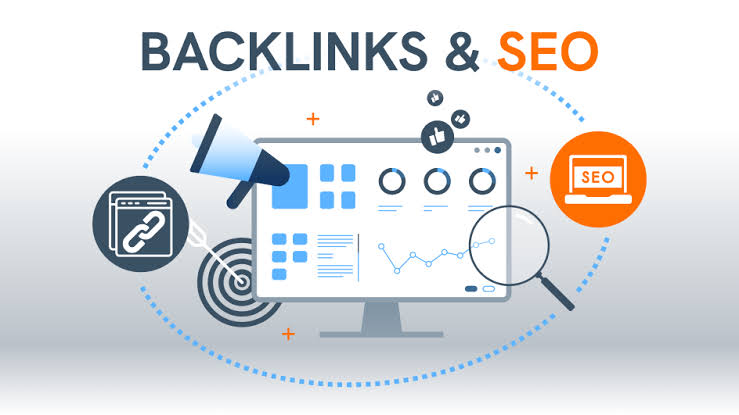
    A backlink is a link from another website to your website. It’s like someone saying, “Hey, check out this site!” to others. Backlinks show search engines that your site has good information.

    Example: If a blog links to your recipe page, that’s a backlink.

    Why Do Backlinks Boost SEO Matter?

    Backlinks are like votes. The more votes you get, the more trusted your site becomes. Search engines like Google notice this. They will rank your page higher if many good websites link to you.

    Backlinks help:

    • Increase your website ranking

    • Bring more visitors

    • Build trust and authority

    • Help search engines find your pages

    Types of Backlinks

    There are two main types:

    1. Good Backlinks Boost SEO

    These come from trusted and high-quality websites. These backlinks are strong and help SEO the most.

    2. Bad Backlinks

    These come from spammy or low-quality websites. Too many of these can hurt your SEO.

    It’s always better to have fewer strong backlinks than many weak ones.

    How to Get Backlinks Boost SEO

    Getting good backlinks takes time, but it’s worth it. Here are simple ways to earn them:

    Write Helpful Content

    When your blog or article is useful, other sites will want to share it.

    Guest Posting

    You can write articles for other websites and add your link to the post.

    Share on Social Media

    Sharing your content on platforms like Facebook or LinkedIn. Can lead to backlinks when others find it useful.

    Ask for Links

    If someone talks about your business but doesn’t link to you, send a friendly message and ask for a link.

    Backlinks and Trust

    Google wants to give people the best results. If trusted sites link to your website, it shows that your site is helpful too. This trust helps your site move up in search results.

    Common Backlinks Boost SEO Mistakes

    Some people try to cheat the system by buying backlinks or using fake sites. This can hurt your SEO in the long run.

    Avoid:

    • Buying backlinks

    • Using link farms

    • Spamming blog comments with your link

    Always focus on natural, honest ways to get backlinks.

    Final Thoughts

    Backlinks are a big part of SEO. They help your site grow by bringing in traffic and improving your rank on search engines. The best backlinks come from good websites that share your content because it’s useful.

    Conclusion

    Backlinks boost SEO by acting as a trust signal to search engines. They help your website rank better, get more visitors, and become a trusted source online. Start building backlinks by sharing great content and connecting with others online. With time, your site will grow strong and get noticed.

    Shop Now

    Follow us on Instagram and Facebook. For More Products, visit our Website.

  • What Counts as SEO

    What Counts as SEO

    What Counts as SEO

    What Counts as SEO

    Counts SEO stands for Search Engine Optimization. It helps your website show up on search engines like Google. If you want more people to visit your site, SEO is very important.

    But what counts as SEO? Let’s look at the main parts that help your website rank better.

    What Is Counts SEO?

    SEO is the way you make your website better for search engines. When people search online, SEO helps your site show up in the top results. This brings more visitors, more clicks, and more trust.

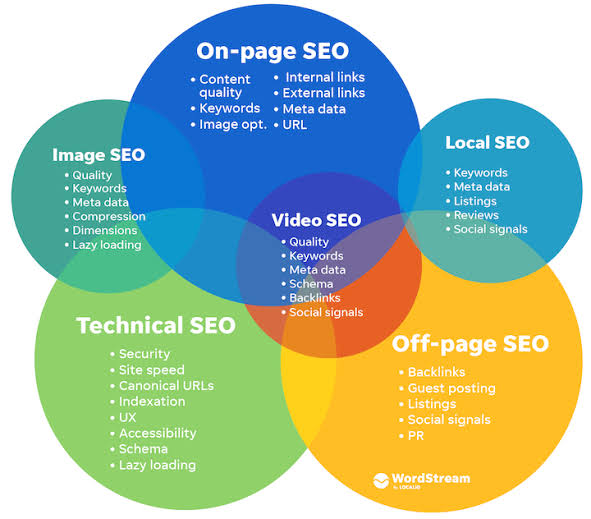
    On-Page SEO

    On-page SEO means things you do on your website pages to help them rank. This includes:

    Counts SEO Good Titles

    Every page needs a short and clear title that tells what the page is about. Use the right keywords in the title.

    Headings

    Use headings like H1, H2, and H3 to organize your content. This makes it easy to read.

    Keywords

    Use words that people search for. Add them in your text, titles, and image names, but don’t use them too much.

    Meta Description

    This is the short text that shows in search results. It should explain the page and include keywords.

    Off-Page SEO

    Off-page SEO is what happens outside your website. It helps build trust.

    Backlinks

    When other websites link to yours, it tells search engines that your site is trusted.

    Social Sharing

    If people share your posts on social media, it brings more visitors. This can help your page rank higher.

    Technical Counts SEO

    This part deals with how your site works behind the scenes.

    Page Speed

    Fast websites are better for users. If your site is slow, people leave quickly.

    Counts SEO & Mobile-Friendly

    Your site should look good on phones and tablets. Most people use mobile to search.

    Secure Website

    Having HTTPS (with a lock symbol) makes your site safe. Google also likes secure websites.

    Local Counts SEO

    If you run a shop or service in one area, local SEO helps people near you find your business.

    Google My Business

    Make a free profile with your name, phone number, and hours.

    Local Keywords

    Use words like “best pizza in Lahore” or “doctor near me” in your content.

    Content Counts as SEO

    Good content is the heart of SEO. If your page helps people, they will stay longer. This tells search engines your site is useful.

    Write content that:

    • Answers common questions

    • Is easy to read

    • Is updated often

    Conclusion

    SEO is more than just keywords. It includes what’s on your page, what others say about your site, and how your website works. Everything from fast loading to mobile use matters. If you take care of all these parts, your website will do well on search engines.

    Start small. Use simple SEO steps to grow your traffic and make your site stronger.

    Shop Now

    Follow us on Instagram and Facebook. For More Products, visit our Website.

  • What Improves Domain Authority

    What Improves Domain Authority

    What Improves Domain Authority

    Improves Domain Authority (DA) shows how strong and trusted your website is. It is like a score from 1 to 100. The higher your score, the more likely your website. Will rank on the first page of search engines like Google.

    Let’s explore what improves Domain Authority and how you can build a strong website.

    What Is Improves Domain Authority?

    Domain Authority is a number made by a company called Moz. It tells how powerful a website is. New websites start with a low score, but over time, that score can grow.

    DA is not used by Google directly, but it helps you understand how your website compares to others.

    Why Improves Domain Authority Is Important

    A higher Domain Authority means:

    • Better chance to rank on Google

    • More website traffic

    • More trust from users and brands

    • Better performance in SEO

    Even small changes can help improve your score over time.

    Simple Ways to Improve Domain Authority

    1. Get Quality Backlinks

    Backlinks are links from other websites to yours. Google sees these as a sign of trust. But not all links are good. You need quality links from trusted websites.

    How to get backlinks:

    • Write helpful blog posts

    • Share your articles on social media

    • Ask other websites to link to your content

    2. Post Helpful Content

    Content is king. Write content that helps your readers. Use simple words, short sentences, and clear ideas.

    Tips:

    • Use images or videos

    • Answer common questions

    • Add keywords people search for

    3. Make Your Website Mobile-Friendly

    Most people use phones to visit websites. Your site should open fast and look good on phones and tablets.

    Use:

    • Easy-to-read text

    • Simple design

    • Fast-loading pages

    4. Improve Page Speed

    If your site loads slowly, visitors will leave. That hurts your SEO and DA. Use tools like Google PageSpeed Insights to check your speed.

    Quick fixes:

    • Use smaller images

    • Remove extra plugins

    • Use good hosting

    5. Keep Visitors on Your Site

    If people stay longer on your website, it helps your DA. Add:

    • Internal links (links to your pages)

    • Videos or infographics

    • Clear headings

    6. Fix Broken Links

    Links that don’t work make your site look weak. Check your website often and remove or fix broken links.

    How Long Does It Take to Improves Domain Authority DA?

    It takes time to grow Domain Authority. You may need months to see a real change. But if you keep improving your site, the results will come.

    Final Thoughts

    You don’t need to be a tech expert to improve Domain Authority. Just follow the easy steps: get good links, and write helpful content. And keep your website working well. These actions build trust and help your site grow.

    Conclusion

    Improving Domain Authority is a smart move for any website owner. With patience and good habits—like quality content, and fast pages. And strong links—you can raise your score and reach more people online.

    Shop Now

    Follow us on Instagram and Facebook. For More Products, visit our Website.

  • Why Title Tags Matter

    Why Title Tags Matter

    Why Title Tags Matter

    Why Title Tags Matter

    When you search for something online, the first thing you see is the Title Tags Matter of a webpage. This title is called a title tag. It tells search engines and people what the page is about.

    Even though it’s short, a title tag is significant. It can help your website get more clicks, more visitors, and better rankings.

    Let’s learn why title tags matter and how they help websites grow.

    What Is a Title Tag?

    A title tag is the name of a web page that shows up in:

    • Search engine results (like Google)

    • The tab at the top of your web browser

    • When you share a link on social media

    It is written inside the website’s HTML code. For example:

    <title>Best Fruits for Glowing Skin</title>

    This short sentence helps people understand what they will find on that page.

    Why Are Title Tags Important?

    1. First Thing People See

    The title tag is the first thing a person reads in search results. A clear and strong title tag can make people want to click on your page.

    2. Helps Search Engines

    Search engines like Google use title tags to know what your page is about. This helps your website show up when someone searches for related words.

    3. More Clicks, More Visitors

    More people will click on your title tag if it is interesting and easy to understand. That means more visitors to your website, and more chances to share your message or sell your product.

    Tips to Write a Good Title Tag

    Follow these simple steps to write the best title tag:

    • Keep it short: Use 50–60 characters only.

    • Add keywords: Use words that people search for online.

    • Make it clear: Tell people what the page is about.

    • Add your brand name (if needed).

    Example: Instead of: “Welcome to Our Website” Use: “Healthy Breakfast Ideas. For Kids– Easy Recipes”

    What Happens If You Ignore Title Tags?

    If you do not write a title tag, Google may choose one for you. But it may not be the best choice. This can:

    • Make your page look unclear

    • Lower your rank in search results

    • Lose clicks and traffic

    So, writing your title tag gives you better control and results.

    Best Time to Use Title Tags

    Title tags should be used on every page of your website:

    • Home page

    • Blog posts

    • Product pages

    • About page

    Each page should have a different title tag that fits the topic of that page.

    Final Thoughts

    Title tags may seem small, but they do a big job. They help both people and search engines understand your website. They also bring more clicks and help your site grow.

    Conclusion

    A strong title tag is key to a strong website. It helps people find your page, click on it, and trust it. If you want more visitors and better SEO, always write smart, clear, and helpful title tags.

    Shop Now

    Follow us on Instagram and Facebook. For More Products, visit our Website.

  • What is Local SEO

    What is Local SEO

    What is Local SEO?

    What is Local SEO

    Understanding Local SEO

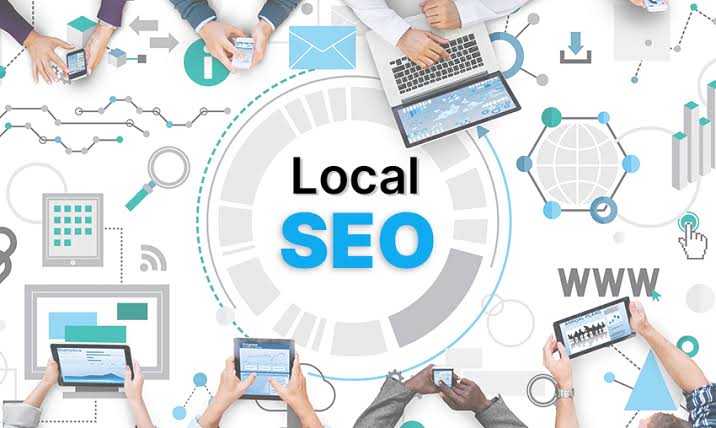
    Local SEO means helping your business show up in online searches. When people nearby look for things you offer. It is very important for small shops and restaurants. Or services that want to attract customers from their local area.

    For example, if someone searches “best pizza near me.” local SEO helps pizza places nearby appear in the results.

    Why Local SEO Is Important

    Most people search on Google to find places close to them. If your business is not easy to find online, you could lose many customers.

    SEO helps your business:

    • Appear on Google Maps

    • Show up in local search results

    • Get more phone calls and visits from nearby customers

    How Does Local SEO Work?

    Google uses many factors to decide which businesses to show in local searches. These include:

    • Your business name, address, and phone number (called NAP)

    • Reviews from customers

    • How close the business is to the searcher

    • Keywords people use to find your business

    By improving these things, your business can rank higher in local search results.

    Steps to Improve Local SEO

    To get better at SEO, try these easy steps:

    1. Create a Google Business Profile. This free listing shows your address, hours, and photos on Google.

    2. Make sure your NAP is the same everywhere online—on your website. Social media, and directories.

    3. Ask happy customers to leave positive reviews. Reviews help build trust and improve rankings.

    4. Use local keywords on your website, like the city or neighborhood name.

    5. Add your business to online directories like Yelp or Yellow Pages.

    Benefits of Local SEO

    When you do SEO well, you get many benefits:

    • More people find your business online

    • Increased phone calls and visits

    • Better reputation with good reviews

    • Stronger presence in your community

    SEO helps your business grow by reaching customers who want to buy nearby.

    Common Mistakes to Avoid

    Some mistakes can hurt your SEO efforts, such as:

    • Inconsistent business info across websites

    • Ignoring customer reviews

    • Not using local keywords

    • Forgetting to update your Google Business Profile

    Avoid these mistakes to keep your SEO strong.

    Conclusion

    Local SEO is a smart way to help your business get noticed by people close to you. It works by showing your business in local searches and maps.

    By keeping your info correct, and asking for reviews. And using local words, your business can grow faster. Start working on your SEO today to get more nearby customers!

    Shop Now

    Follow us on Instagram and Facebook. For More Products, visit our Website.

  • How Link-Building Helps SEO

    How Link-Building Helps SEO

    How Link-Building Helps SEO

    How Link-Building Helps SEO

    What Is Link-Building Helps SEO?

    Link-building helps SEO means getting other websites to add links that point to your website. These links are called backlinks. Backlinks are important because they show Google. that your website is trusted by others.

    Why Are Link-Building Helps SEO Important?

    Google uses links like votes. If many websites link to your page, Google thinks your page has good information. This helps your website show up higher in search results.

    Without good links, your website may not get much traffic from search engines.

    How Links Build Trust and Authority

    When websites link to your content, it is like they are saying, “This page is useful.” Google sees this as a sign that your website is important and trustworthy.

    If your site has strong backlinks, Google will rank it better than sites with fewer or bad links.

    Types of Links That Help SEO

    Not all links are equal. Some links help SEO more than others:

    • Links from popular websites

    • Links from websites in your topic area

    • Links from trusted websites like news sites or universities

    Getting these links helps Google trust your site more.

    How to Get Good Link-Building Helps SEO

    You can build links by:

    1. Writing great articles that people want to share

    2. Asking other website owners to link to your site

    3. Sharing your content on social media

    4. Creating helpful guides or videos that others find useful

    5. Guest posting on other websites

    Link-Building and Website Traffic

    Good links not only help Google rank your website but also bring visitors directly. When someone clicks a link on another site, they come to your page.

    This can increase your audience and grow your business or blog.

    Link Quality Matters More Than Quantity

    It is better to have fewer high-quality links than many low-quality links. Bad links from spammy websites can hurt your SEO.

    Google checks where your links come from. So, focus on building strong and natural links.

    Conclusion

    Link-building is a key part of SEO. It helps Google trust your website and ranks you higher. Getting good backlinks can also bring more visitors to your site.

    Remember, always focus on creating useful content. And building real connections for the best SEO results.

    Shop Now

    Follow us on Instagram and Facebook. For More Products, visit our Website.

  • Why Duplicate Content Fails

    Why Duplicate Content Fails

    Why Duplicate Content Fails

    Why Duplicate Content Fails

    What Is Duplicate Content?

    Duplicate Content Fails means having the same words or very similar text on more than one page on the internet. This can happen on your website or between different websites.

    For example, if two pages say almost the same thing, that is duplicate content.

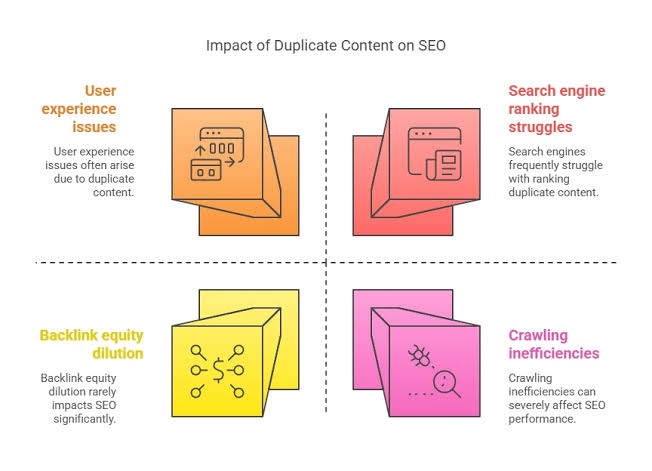
    Why Duplicate Content Is Bad for SEO

    Google wants to show new and useful information to people. When there is duplicate content, Google can get confused about which page to show.

    If Google finds many pages with the same content, it may not rank any of them well. This means your site will get less traffic.

    How Google Handles Duplicate Content

    Google tries to pick the best page to show from duplicate ones. Sometimes it chooses only one and ignores the rest. This can hurt your website if Google picks a page that is not yours or one that you don’t want to rank.

    If Google thinks you copied content from another site, it may lower your site’s trust.

    Reasons Duplicate Content Happens

    Duplicate content can happen for many reasons, such as:

    • Copying text from another website

    • Using the same text on different pages on your site

    • Printer-friendly versions of pages

    • URL changes without proper redirects

    How Duplicate Content Hurts Your Website

    Duplicate content can cause problems like:

    • Losing search engine ranking

    • Losing website visitors

    • Lower trust from Google

    • Wasting your website’s “crawl budget” (how often Google checks your site)

    It is important to fix duplicate content quickly to avoid these issues.

    How to Avoid Duplicate Content

    Here are easy ways to stop duplicate content:

    1. Write unique content for every page. Don’t copy from other sites or pages.

    2. Use canonical tags to tell Google which page is the main one.

    3. Set up 301 redirects if you move or delete pages.

    4. Avoid creating different URLs for the same content.

    5. Use tools like Google Search Console to find duplicate content issues.

    Benefits of Unique Content

    When your content is original and helpful:

    • Google ranks your pages higher

    • More visitors come to your site

    • People trust your website

    • Your website grows stronger over time

    Conclusion

    Duplicate content is bad for your website’s SEO and trust. Google wants to give the best results, so it avoids showing similar pages. Writing unique and clear content for every page helps your site grow and succeed.

    Always check for duplicate content and fix it to keep your website healthy and popular. Good, fresh content will always win in the long run.

    Shop Now

    Follow us on Instagram and Facebook. For More Products, visit our Website.

  • Why Link Quality Matter

    Why Link Quality Matter

    Why Link Quality Matter

    Why Link Quality Matter

    What Does Link Quality Matter in SEO?

    Why Link Quality Matter are connections from one website to another. They can be internal (within your site) or external (from other sites). In SEO, links help search engines understand how helpful and trusted your content is.

    But not all links are the same. Some are good, and some are bad. That’s why link quality matters.

    High-Quality Links Help You Rank Higher

    Search engines like Google look at the quality of the links pointing to your site. If trusted websites link to your page, search engines think your content is good.

    For example, a link from a big news site is more helpful than a link from a small, unknown blog.

    Good Links Build Trust

    When trusted sites link to you, it shows that your content is useful. This builds trust with both search engines and readers. People are more likely to click and read your content when they see it linked from a trusted source.

    Low-Quality Links Can Hurt You

    Not all links are good. Some links from spammy or low-trust sites can hurt your SEO. If Google sees too many bad links, your site can drop in rankings.

    That’s why it’s better to have fewer high-quality links than many bad ones.

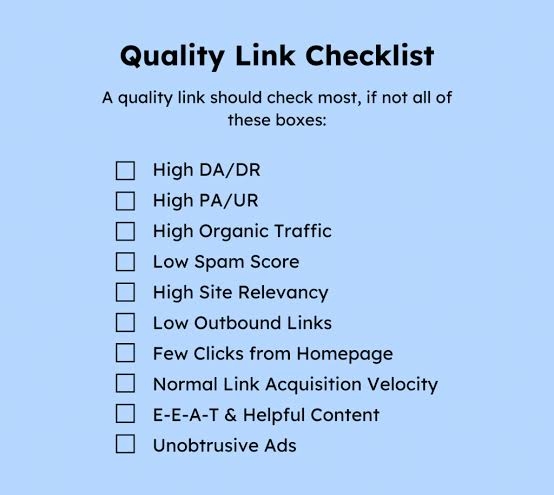
    What Makes a Link High Quality?

    A good link usually comes from a:

    • Trusted website

    • The page that is about the same topic

    • A site that gets a lot of visitors

    • Site with strong domain authority

    The better the website, the stronger the link.

    Ways to Get Good Links

    Here are some simple and clean ways to earn high-quality links:

    1. Create helpful content: When your content is useful. People will naturally want to share and link to it.

    2. Guest posting: Write for other trusted websites in your field.

    3. Share on social media: More shares can lead to more natural links.

    4. Build relationships: Connect with other bloggers. and websites that may want to link to your work.

    Link Quality Matter Relevance Too

    It’s not just about the size of the site. A link from a small website in your niche (topic area) can be more useful than a big site on a different topic. Make sure your links come from pages that relate to your content.

    Keep Checking Your Links

    Use tools like Google Search Console or free link checkers to see who is linking to your site. If you find spammy or fake links, try to remove them or use a disavow tool to tell Google to ignore them.

    Conclusion

    Link quality plays a big role in how your website ranks. High-quality links build trust, improve search results, and bring in more visitors. Always focus on getting clean. Useful, and topic-related links instead of just more links.

    Shop Now

    Follow us on Instagram and Facebook. For More Products, visit our Website.

  • How To Write SEO Keywords

    How To Write SEO Keywords

    How to Write SEO Keywords

    How To Write SEO Keywords

    What Are Write SEO Keywords?

    Write SEO keywords are words or phrases that people type into search engines like Google. These keywords help your website show up when someone is looking for your content. Using the right keywords helps bring more visitors to your site.

    But how do you write SEO keywords the right way? Let’s learn step by step.

    Why Write SEO Keywords Matter

    When you use smart keywords, search engines know what your page is about. This helps your page show up in search results. More people find your website. That means more readers, customers, or fans.

    Step 1: Know What People Are Searching

    The first step is to find out what people are typing into search engines. These are the keywords you want to use.

    Use tools like:

    • Google Search Suggestions

    • Ubersuggest

    • Google Keyword Planner

    • AnswerThePublic

    Type your topic into one of these tools and see the popular search words.

    Example: If your topic is “healthy breakfast,” people may search:

    • easy healthy breakfast

    • best breakfast for energy

    • quick morning meals

    These are your SEO keywords.

    Step 2: Use Long-Tail Keywords

    Long-tail keywords are longer and more specific. They are easier to rank for and bring the right people to your site.

    Instead of writing “breakfast,” use “easy breakfast ideas. for kids” or “healthy breakfast without eggs.”

    These longer phrases help your content match exactly what people want.

    Step 3: Add Keywords in the Right Places

    Once you find good keywords, put them in key parts of your page:

    • Title

    • Headings (like H1 and H2)

    • First 100 words

    • Image names (if any)

    • Meta description

    • URL (if you can)

    Do not use the same keyword too many times. This is called “keyword stuffing” and it can hurt your SEO.

    Step 4: Write SEO Keywords Naturally

    Even when using keywords, make sure your content sounds natural. Your readers are real people. Use simple words and short sentences. Write like you are talking to a friend.

    Google likes helpful and easy-to-read content.

    Step 5: Update Old Keywords

    Over time, search trends change. It’s smart to check old posts and update the keywords.

    Add new long-tail keywords. Remove words that no one searches anymore. This keeps your content fresh and helps your ranking stay strong.

    Conclusion

    Writing SEO keywords is about knowing what people. Search and place those words smartly in your content. Use keyword tools, and choose long-tail phrases. And place keywords in important parts of the page.

    Remember to write, simply, and for real people. When you use SEO keywords the right way, your content becomes. Easier to find—and your website can grow fast and strong.

    Shop Now

    Follow us on Instagram and Facebook. For More Products, visit our Website.

  • What Makes SEO Powerful

    What Makes SEO Powerful

    What Makes SEO Powerful

    What Makes SEO Powerful

    What Makes SEO Powerful?

    Makes SEO Powerful stands for Search Engine Optimization. It is the process of making your website show up when people search for something online. The better your SEO, the more people find your website.

    SEO helps websites get free traffic from Google and other search engines. But what makes SEO so powerful?

    Makes SEO Powerful Brings Free Traffic

    One of the best things about SEO is that it brings free traffic. You don’t need to pay for ads. Once your pages rank high, they can stay there for a long time.

    More visitors mean more chances to grow your business or share your message.

    Makes SEO Powerful Builds Trust

    People trust websites that show up first in search results. If your site is easy to read and loads fast, visitors will trust it even more.

    A well-ranked page means the content is helpful. That gives your brand more power.

    SEO Reaches the Right People

    With SEO, your site shows up for people who are already looking for what you offer. That makes your visitors more likely to stay, read, or buy.

    You don’t have to find the audience—they find you.

    Key Parts That Make SEO Powerful

    1. Keywords

    These are the words people type in search engines. Using the right keywords helps your pages show up for those searches.

    Use simple, clear words people use often. Long-tail keywords (like “best shoes for kids under $50”) can help bring targeted traffic.

    2. Great Content

    SEO works best when your content is useful and easy to read. Google ranks websites with clear, helpful, and well-written information.

    Write short sentences, use headings, and add images when needed.

    3. Fast Website Speed

    A slow website can lose visitors. Search engines also rank fast-loading pages higher. Make sure your website opens quickly on phones and computers.

    4. Mobile-Friendly Pages

    Many people use phones to search online. Your website should look good and work well on all screen sizes.

    5. Backlinks

    When other websites link to yours, it shows that your content is helpful. These links can boost your SEO power and improve rankings.

    Why SEO Is Better Than Ads

    Ads stop working once you stop paying. But SEO keeps working over time. A strong SEO page can bring traffic for months or even years.

    That’s why SEO is seen as a smart long-term plan.

    Conclusion

    SEO is powerful because it brings free traffic, and builds trust. And helps the right people find your site. It works 24/7 without extra cost once set up right.

    By using good keywords, and writing helpful content. And keeping your website fast and mobile-friendly, you can enjoy the real power of SEO. Keep learning, and updating. And improving your pages—and your website will grow stronger every day.

    Shop Now

    Follow us on Instagram and Facebook. For More Products, visit our Website.

  • What is Technical SEO

    What is Technical SEO

    What is Technical SEO?

    What is Technical SEO

    Understanding Technical SEO First

    Technical SEO stands for Search Engine Optimization. It helps your website show up in Google or other search engines. When people search for something. good SEO helps your website appear higher in the results.

    There are many parts of SEO and is one of the most important.

    What is Technical SEO?

    Technical SEO means making your website easy for search engines to read and use. It’s not about the words you write, but about how your website works behind the scenes.

    This helps search engines understand your website better and rank it higher.

    Why Technical SEO Matters

    Even if your content is good, search engines may not show your site if it’s slow or hard to read. SEO fixes those problems.

    A fast, clean, and working site makes Google happy—and that means more visitors for you.

    Key Parts of Technical SEO

    Here are some important things to check:

    1. Website Speed

    If your site is slow, people leave. Search engines also prefer fast websites.

    2. Mobile-Friendly Design

    Your website should look good and work well on phones and tablets.

    3. Safe and Secure (HTTPS)

    A secure website keeps data safe. If your site uses HTTPS, it builds trust.

    4. Good Site Structure

    Pages should be easy to find. Use clear menus and links.

    5. Fix Broken Links

    Make sure all links on your site work. Broken links hurt your ranking.

    6. XML Sitemap

    This is like a map for search engines. It helps them find and understand your pages.

    7. Robots.txt File

    This tells search engines what they can or cannot look at on your site.

    Tools to Help With Technical SEO

    You don’t have to do everything by hand. Use tools like:

    • Google Search Console – shows problems with your site

    • PageSpeed Insights – checks your site speed

    • Screaming Frog – finds broken links and other errors

    These tools help you find and fix problems quickly.

    How Often Should You Check?

    Check your website’s SEO every few months. If you make big changes, always test again.

    You can also check after:

    • Changing your website design

    • Moving to a new host

    • Adding new tools or plugins

    Conclusion

    Technical SEO is all about making your website run better. When your site is fast, safe, and easy to use, search engines and visitors will love it.

    It may sound hard at first, but small steps can make a big difference. Use tools, check your pages, and keep learning. A strong technical setup is the secret to long-term success online.

    Shop Now

    Follow us on Instagram and Facebook. For More Products, visit our Website.

  • Why Content Must Update

    Why Content Must Update

    Why Content Must Update

    Why Content Must Update

    What Is Content Must Update?

    Content Must Update means making changes to your old blog posts, articles, or web pages. It can be fixing words, adding new facts, or making it easier to read. When you keep your content fresh, it helps both your readers and your website.

    Why Old Content Stops Working & Why Content Must Update

    Over time, the internet has changed. New information comes, new rules start, and people’s questions change. If your content is old, it may:

    • Have wrong or old facts

    • Use keywords no one searches anymore

    • Look bad on new phones or computers

    • Not show up in search results

    This means fewer people visit your website.

    Benefits of Content Must Update

    1. Better Search Rankings

    When you update content, search engines like Google see it as fresh and useful. This can move your blog higher in search results.

    2. More Traffic

    Updated content brings new visitors. People want answers that are true and up-to-date.

    3. Trust From Readers

    If your blog has the latest info, people will trust it more. They may come back and even share your posts.

    What To Update in Your Content

    Here are some simple things you can change:

    • Fix grammar or spelling mistakes

    • Add new facts, dates, or examples

    • Update old links that don’t work

    • Make it easier to read with short sentences

    • Add new images or charts

    • Use new keywords people are now searching

    How Often Should You Update?

    You don’t need to update every day. But check your old posts every few months. Start with blogs that bring the most traffic. Or are about fast-changing topics, like health, tech, or news.

    Updating vs. Writing New

    Writing new content is good. But updating is faster and easier. It saves time and gives results. A good update can sometimes bring more traffic than a brand-new blog.

    Example: If you wrote about “Best SEO Tips in 2022,” you can update it to “Best SEO Tips in 2025” and add the newest methods.

    Tools That Can Help

    You can use free tools like:

    • Google Search Console – to find pages losing traffic

    • Grammarly – to fix grammar and spelling

    • SEO tools – to check your keywords and rankings

    These tools make it easy to decide what to update.

    Conclusion

    Updating content is a smart way to grow your website. It helps your posts rank higher, brings in more readers, and builds trust. In the fast world of the internet, old content fades. But updated content shines again.

    If you want your blog or business to stay strong, make content updates a regular habit. Just a few small changes can make a big difference.

    Shop Now

    Follow us on Instagram and Facebook. For More Products, visit our Website.

  • Why SEO is Necessary

    Why SEO is Necessary

    Why SEO is Necessary

    Why SEO is Necessary

    What is SEO?

    SEO stands for Search Engine Optimization. It is a way to help your website show up on search engines like Google. When people search for something, SEO makes sure your website is easy to find.

    For example, if you have a cake shop and someone searches. For “best cake shop near me,” good helps your website appear on the first page.

    Why Does SEO Matter?

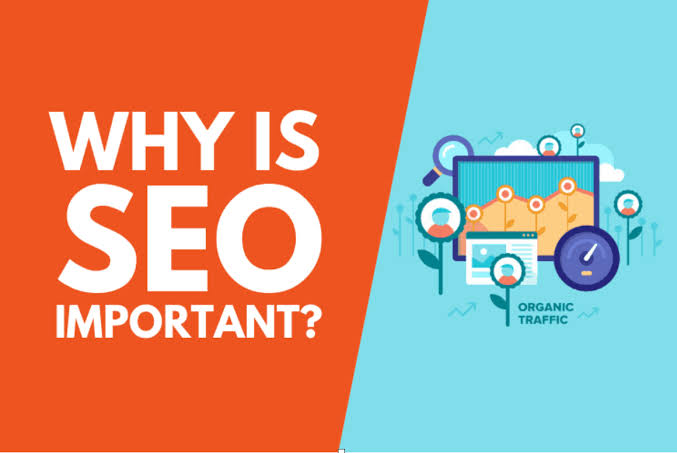
    SEO is important because it helps people find your website. If your website does not appear in search results, people may not know your business exists. Here are some simple reasons why is necessary:

    1. Brings More Visitors

    When your website ranks high on Google, more people will visit it. More visitors mean more chances to sell your product or share your idea.

    2. Builds Trust

    People trust websites that show up first in search results. If your site is on top, users feel it is safe and helpful.

    3. Saves Money

    SEO is free compared to paid ads. You don’t have to spend money every time someone clicks on your site.

    How Does SEO Work?

    SEO uses special steps to improve your site. Here are some easy ways to help:

    • Keywords: These are words people type in search engines. Using the right keywords in your blog or website helps people find you.

    • Content: Good content gives users the answers they want. If your article is useful, Google will rank it higher.

    • Links: When other websites link to yours, it tells search engines that your site is trusted.

    • Mobile-Friendly: If your website works well on phones, it gets a better rank.

    SEO Helps All Types of Websites

    No matter what your website is about—shopping, health, food, or learning is important. Even small blogs or new websites can grow with good.

    If you run a local shop, can bring people from your area. If you sell online, can help you reach people all over the world.

    What Happens Without SEO?

    Without SEO, your site may stay hidden. Even if you have good products or ideas, people may not find them. You might also need to spend more money on ads just to get visitors.

    Also, your competitors who use will get more traffic and customers than you.

    Conclusion

    SEO is necessary because it brings people to your website, helps build trust, and saves money. It helps your business or blog grow without spending much. Whether your site is big or small, make sure it is seen by the right people.

    If you want your website to succeed, start using it today Simple steps can make a big difference.

    Shop Now

    Follow us on Instagram and Facebook. For More Products, visit our Website.

  • Why User Intent Matter

    Why User Intent Matter

    Why User Intent Matters

    Why User Intent Matter

    What Is User Intent?

    User intent means what a person wants when they search online. Sometimes people type a few words into Google, but those words have a deeper meaning. For example, someone typing “best phone 2025” may want to buy a phone, not just read about it.

    Understanding user intent helps websites give the right answer. If a website matches the user’s goal, Google will show it higher in search results.

    Why Is User Intent Important?

    Search engines like Google want users to find what they are looking for quickly. If your content matches the user’s intent, your page gets more clicks, more time spent, and better ranking.

    When websites understand users, they can:

    • Attract the right visitors

    • Increase traffic

    • Boost sales

    • Keep users happy

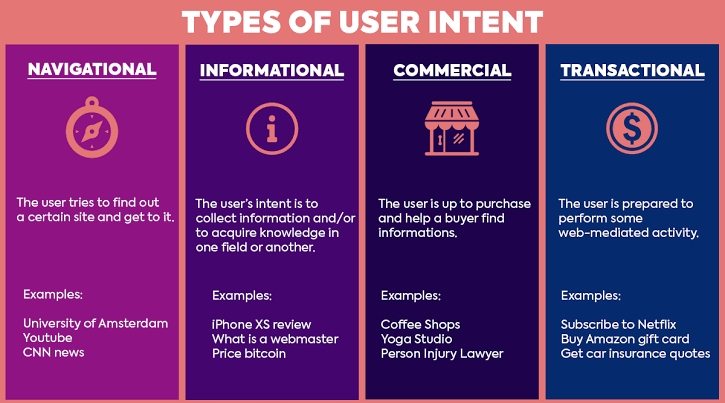
    Types of User Intent

    There are three main types of user intent. Knowing these helps you create better content.

    1. Informational Intent

    The user wants to learn something. Examples:

    • What is SEO?

    • How does email work?

    Your page should simply answer the question.

    2. Navigational Intent

    The user wants to go to a specific website. Examples:

    • Facebook login

    • YouTube homepage

    They already know what they want and are just finding a direct path.

    3. Transactional Intent

    The user wants to do something, like buy a product or sign up. Examples:

    • Buy red shoes

    • Best laptop under $500

    For this type, your page should guide them to take action.

    How to Match User Intent

    To rank well on search engines, your content must match what the person is looking for. Here are easy tips:

    • Use the right keywords

    • Write simple answers

    • Add helpful details

    • Check search results

    Type your topic into Google and see what pages are showing. This tells you what users want.

    Real Example

    Let’s say someone searches “how to lose weight.” This is informational intent. Your content should explain safe ways to lose weight, not just sell a product. If you jump into selling, users may leave, and your ranking may drop.

    Now, if someone searches “buy protein powder,” this is transactional intent. A product page with prices and buy buttons would be best.

    Conclusion

    User intent is the key to better SEO and happy visitors. When you understand what people want, you can give them the right content. This builds trust, increases clicks, and improves your site’s position on Google.

    So, always ask: What does the user want? Then write for that need in a clear, easy way.

    Shop Now

    Follow us on Instagram and Facebook. For More Products, visit our Website.

  • What SEO Experts Do

    What SEO Experts Do

    What SEO Experts Do

    What SEO Experts Do

    Who Are SEO Experts?

    An SEO expert is someone who knows how to help websites appear higher on search engines like Google. When people search for something online, they usually click on the first few results. SEO experts help websites get to those top spots.

    They use smart tools and ideas to make websites easy to find. Their job is very important for online success.

    Why Businesses Need SEO Experts

    Every business wants more people to visit its website. More visitors mean more chances to sell something or share a message. SEO makes that happen. They understand how Google works and help websites grow.

    A business with a good SEO plan can beat its competition. That’s why many companies hire SEO to help them.

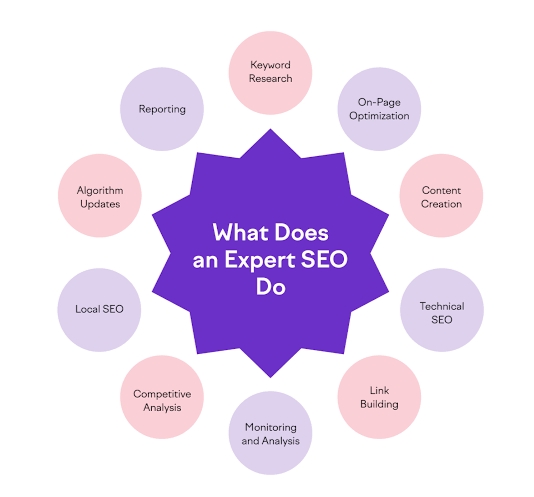
    What Tasks Do SEO Experts Do?

    SEO experts do many helpful things. Let’s look at the main tasks they work on.

    1. Find the Right Keywords

    SEO search for words that people type into Google. These are called keywords. Using the right keywords helps people find your site. For example, if you sell baby shoes, a good keyword might be “soft shoes for newborns.”

    2. Improve Website Content

    They help write or fix the words on your website. The goal is to make the content clear, useful, and easy to read. Google likes good content and ranks it higher.

    3. Make the Website Faster

    A slow website can make people leave. SEO check how fast your site loads and fix things to make it faster.

    4. Fix Mobile Problems

    Many people use phones to browse. If a site does not work well on mobile, Google will rank it lower. SEO makes sure websites work well on all devices.

    5. Build Links from Other Sites

    Getting links from other websites is like getting votes. It tells Google your site is trusted. SEO helps you get these links in the right way.

    6. Track and Measure Results

    SEO is not a one-time job. Experts keep track of how the site is doing. They use tools to see what is working and what needs to change.

    Skills SEO Experts Need

    Good SEO experts must:

    • Know how search engines work

    • Be good at writing and research

    • Understand website design basics

    • Use tools like Google Analytics

    • Keep learning as rules change often

    They mix creativity with technical knowledge to improve websites.

    Final Thoughts

    SEO experts help websites grow by making them easy to find online. Their work brings more visitors and helps businesses succeed. Whether it’s a small blog or a big store, it plays a big role in online success.

    Conclusion

    SEO experts know how to get websites to the top of search results. They find keywords, fix websites, and improve content. Their work supports online growth and brings more people to your site. If you want to grow your website, hiring an SEO expert can make a big difference.

    Shop Now

    Follow us on Instagram and Facebook. For More Products, visit our Website.

  • How SEO Supports Marketing

    How SEO Supports Marketing

    How SEO Supports Marketing

    How SEO Supports Marketing

    What Is SEO Supports Marketing?

    SEO Supports Marketing stands for Search Engine Optimization. It means making changes to your website so that it shows up on search engines like Google. When people search for something, they usually click on the top results. SEO helps your website become one of those top results.

    If more people find your site, your business can grow. That’s why SEO is a big part of online marketing.

    What Is SEO Supports Marketing?

    Marketing is how a business tells people about its products or services. It can be done in many ways, like ads, social media, emails, or videos. The goal of marketing is to reach people, share a message, and make them interested in what you offer.

    Now let’s see how SEO and marketing work together.

    How SEO Helps in Marketing

    SEO and marketing go hand in hand. Here’s how SEO supports your marketing work.

    1. Brings More People to Your Website

    When your website ranks higher on search engines, more people visit it. This is called traffic. SEO helps bring free, or organic, traffic. You don’t have to pay for each person who clicks on your site.

    2. Reaches the Right Audience

    SEO helps you reach people who are already looking for what you offer. For example, if someone searches for “best shoes for walking.” and you sell walking shoes, your site can appear in the results. That means the visitor is already interested.

    3. Builds Trust and Credibility

    People trust websites that show up on the first page of Google. A high-ranking website looks more reliable. SEO helps improve your website content. And user experience, which builds trust with your audience.

    4. Works All the Time

    SEO doesn’t stop. Once your site is ranked well, it keeps bringing visitors 24/7. This helps your marketing run even when you are not actively working on it.

    How to Use SEO in Your Marketing Plan

    To get the best results, SEO should be part of your marketing plan. Here’s how you can include it:

    • Use the right keywords in your blog posts, product pages, and headings

    • Make your website mobile-friendly

    • Improve website speed so it loads fast

    • Write helpful content that answers real questions

    • Get other good websites to link to your pages

    These things help your site grow slowly and safely over time.

    SEO vs. Paid Ads

    Some businesses pay for ads to show up on search engines. These are called paid ads. SEO is different because it focuses on free search results. While paid ads stop when you stop paying, SEO gives long-term results.

    Using both together is smart, but SEO gives better value over time.

    Final Words

    SEO is a strong part of digital marketing. It brings traffic, builds trust, and helps people find your business. It supports your marketing by making sure the right people see your content.

    Conclusion

    SEO supports marketing by helping your website show up in search results. It brings more visitors, builds trust, and helps your message reach the right people. If you want to grow your business online, adding SEO to your marketing is a smart move.

    Shop Now

    Follow us on Instagram and Facebook. For More Products, visit our Website.

Follow by Email
Facebook
Instagram